Graphics Design
10 Best Free AI Branding Tools for Small Businesses and Startups

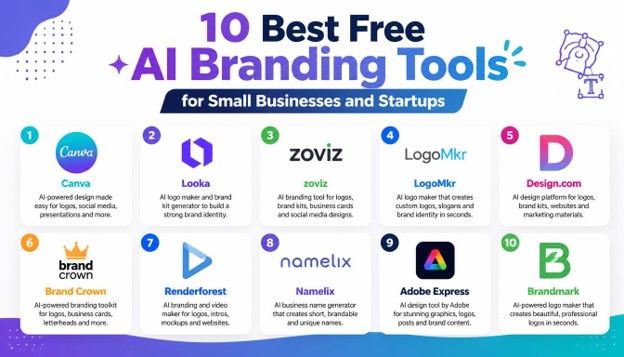
10 Best Free AI Branding Tools for Small Businesses and Startups
Building a memorable brand used to mean hiring a designer, a copywriter, and sometimes a whole agency before you even opened your doors. That reality has changed. Today, a new generation of AI Branding Tools lets founders, freelancers, and small business owners design a logo, choose a color palette, write a tagline, and assemble a complete brand kit in a single afternoon, without spending a rupee or a dollar. Whether you are launching your first startup, rebranding an existing business, or simply need a professional look for your social media pages, the right AI Branding Tools can save you weeks of work and thousands in design fees.
In this guide, we will walk through the 10 best free AI Branding Tools available right now, explain what each one does best, who it is ideal for, and how to actually use it to shape a brand identity that looks like it came from a professional studio. We will also cover how to choose the right AI Branding Tools for your specific business stage, and answer the most common questions small business owners ask before they commit to a tool. By the end, you should have a clear shortlist of AI Branding Tools to try this week, plus a simple framework for evaluating any new tool that launches after this article is published.
Why Small Businesses and Startups Are Turning to AI Branding Tools
Branding has always been one of the most expensive early decisions a founder makes, and it is also one of the easiest to get wrong when there is no budget for a design agency. This is exactly the gap that modern AI Branding Tools were built to close. Instead of waiting weeks for mockups from a freelancer, a founder can now describe their business in a sentence or two and receive dozens of logo, color, and typography options within seconds. AI Branding Tools use machine learning models trained on thousands of professional design patterns, so the output is not a random guess; it reflects real design principles around contrast, spacing, and color psychology.
There is also a speed advantage that matters enormously for early-stage companies. A founder testing a new product idea often needs a working brand identity before they even know if the business will survive its first three months. Paying a designer thousands of dollars for that identity is a bad use of scarce capital. Free AI Branding Tools remove that risk entirely, letting founders iterate on their brand as often as their strategy changes, at no financial cost. This is why adoption has climbed so quickly among bootstrapped startups, solo entrepreneurs, and small retail businesses that simply cannot justify a large design budget in their first year.
Finally, consistency is a real problem for small teams, and this is another area where AI Branding Tools genuinely help. A tool that generates a logo alongside matching business cards, social banners, and email signatures ensures that a brand looks the same everywhere a customer encounters it. That consistency builds trust faster than a beautiful logo sitting next to a mismatched Instagram page. With that context in mind, let’s look at the ten tools worth trying first.

1. Canva (Magic Design and Brand Kit)
Canva remains one of the most complete and beginner-friendly AI Branding Tools on the market, and its free tier is genuinely usable rather than a stripped-down trial. Canva’s Magic Design feature can generate logo concepts, social templates, and full presentation decks from a short text prompt, while its Brand Kit tool lets you store your fonts, colors, and logo files so every new design automatically matches your existing identity. For a small business juggling social posts, flyers, and a website banner all in the same week, this consistency feature alone is worth the signup.
What makes Canva stand out among AI Branding Tools is the sheer breadth of templates layered on top of the AI features. You are never starting from a blank canvas; instead, the AI narrows thousands of professional templates down to a handful that match your brand description, and you refine from there. The free plan includes access to a large library of fonts, stock photos, and icons, which is more than enough for a startup’s first six months of content. Paid plans unlock more premium assets and unlimited brand kits, but the free version alone can carry a small business through logo design, social media graphics, and basic marketing collateral.
Best for: founders who need one tool to handle logo design, social content, and marketing materials without switching between multiple apps.
2. Looka
Looka is one of the most well-known AI Branding Tools built specifically around logo and brand identity creation. You start by entering your company name and selecting a few style preferences, such as modern, playful, or minimalist, and Looka’s AI generates a wide range of logo concepts within moments. The free tier lets you explore and preview unlimited logo designs, which is genuinely useful for founders who are still deciding on a business name or visual direction and want to see how different options actually look before committing.
Beyond logos, Looka extends into a broader brand kit that includes business card templates, social media kits, and even basic website design suggestions, all generated from the same core brand assets. While downloading high-resolution logo files does require a one-time purchase, the free exploration phase is detailed enough that many founders use Looka purely for inspiration and direction before finalizing their design elsewhere. Among AI Branding Tools aimed at logo creation specifically, Looka’s interface is one of the more polished and intuitive options for non-designers.
Best for: founders who want to rapidly explore dozens of logo directions before settling on a final identity.

3. Zoviz
Zoviz has become a favorite among freelancers and small businesses that want a complete branding package rather than just a logo file. After entering a brand name and choosing a preferred style, Zoviz instantly presents multiple AI-generated logo concepts, and from there you can adjust colors, fonts, shapes, and layout until the design matches your brand personality. What sets Zoviz apart from many other AI Branding Tools is that it does not stop at the logo. It builds out an entire supporting kit, including business cards, social media headers, email signatures, and favicons, so your brand looks cohesive across every touchpoint from day one.
The free preview functionality is generous enough to let you fully design and compare multiple brand directions before spending anything. You only need to pay once you want to download high-resolution files or the complete brand kit, which makes Zoviz a low-risk way to test different brand identities for a new business idea. For startups that want their branding to look finished and professional rather than like a placeholder logo, Zoviz is one of the more complete free AI Branding Tools available today.
Best for: startups that want a matching business card, email signature, and social kit alongside their logo, not just a standalone image.
4. LogoMakr
LogoMakr takes a slightly different approach compared to other AI Branding Tools on this list by giving users more manual control over the final design while still using AI-assisted suggestions to speed up the process. It offers a large library of icons, shapes, and fonts that you can combine freely, and its AI features help suggest layouts and color combinations that follow solid design principles. This makes LogoMakr a strong choice for small business owners who have a rough idea of what they want and prefer to fine-tune the details themselves rather than relying entirely on automated output.
The free version allows unlimited design and editing, and exporting a basic low-resolution logo is free as well, which is enough for early testing on social media or a rough website draft. Because it blends manual design freedom with AI-powered suggestions, LogoMakr sits in an interesting middle ground among AI Branding Tools: less automated than Looka or Zoviz, but far faster than starting from scratch in a traditional design program like Illustrator.
Best for: hands-on founders who want creative control but still benefit from AI-suggested layouts and color palettes.
5. Design.com
Design.com is an AI-driven branding platform that focuses on helping small businesses produce a complete, professional identity quickly, without requiring any design background. You simply enter your business name and a short description of what your company does, and the AI generates a set of logo options based on that input, drawing from a large library of industry-specific templates. From there, you can adjust colors, icons, fonts, and layouts until the design feels right for your brand.
What makes Design.com particularly appealing among AI Branding Tools for small businesses is how it packages the logo alongside a broader identity system, including brand guidelines, social templates, and marketing materials, so a founder walks away with more than just a single image file. The free tier is generous enough for exploring and previewing your options extensively, with premium plans unlocking full downloads and additional assets. For businesses that want their branding to look like it came from an agency, without the agency price tag, Design.com is worth testing early in the process.
Best for: business owners who want an industry-specific starting point rather than generic templates.

6. BrandCrowd
BrandCrowd has built a strong reputation for fast, easy logo and website creation backed by a huge library of templates and customization options. Small businesses consistently praise it for its affordable pricing and all-in-one convenience, and among AI Branding Tools it stands out as one of the most beginner-friendly options for anyone who has never designed anything before. The AI narrows down thousands of templates based on your industry and style preferences, and you can then tweak colors, fonts, and icons until the logo feels distinctly yours.
Beyond logo creation, BrandCrowd extends into website building and social media post design, which means the same brand identity you create for your logo can flow directly into your online presence without starting over in a different tool. The free plan supports unlimited design exploration, and while final high-resolution downloads require payment, the platform’s speed and simplicity make it one of the more stress-free AI Branding Tools for entrepreneurs who want to launch quickly without managing five different design apps.
Best for: entrepreneurs who want their logo, website, and social posts built from one cohesive brand identity.
7. Renderforest
Renderforest takes a broader approach than most AI Branding Tools by combining logo design with video creation, animation, and website building under one roof. For small businesses that plan to invest in video marketing or animated promotional content early on, this is a significant advantage, since you can design a logo and then immediately animate it for use in intros, ads, or social media reels using the same brand assets. The AI-assisted logo maker walks you through style and industry preferences before generating a set of options to customize.
Renderforest’s free plan includes access to templates across all of its tools, though exporting in higher resolutions or without watermarks typically requires a paid plan. Still, for a startup deciding between multiple standalone tools for logo design, video creation, and a simple website, consolidating into one platform can save both time and money. Among AI Branding Tools, Renderforest is one of the strongest choices for businesses that know video content will be part of their marketing strategy from the start.
Best for: startups planning to use branded video content, animated logos, or promotional reels alongside their visual identity.
8. Namelix
Before a business can build any visual identity, it needs a name, and this is where Namelix fits into the AI Branding Tools landscape. Namelix is a free AI business name generator that produces short, brandable name ideas based on a description of your business, with controls for style and length so you can steer the output toward something modern, playful, or more traditional. It is a completely free tool with no signup required to start generating names, and unlike broader design platforms, it does one specific job extremely well.
While Namelix does not generate logos or full brand kits itself, it is often the very first stop for founders before they move on to tools like Looka or Zoviz to design their visual identity. Because naming a business is one of the most expensive decisions to reverse later, having a free, fast way to generate and filter dozens of options before committing is genuinely valuable. Any list of AI Branding Tools for early-stage founders should include at least one naming tool, and Namelix is currently the most widely used free option.
Best for: founders who have not finalized a business name yet and need fast, filtered suggestions before moving into logo design.
9. Adobe Express
Adobe Express brings AI-powered design assistance from Adobe’s broader Creative Cloud ecosystem into a simplified, beginner-friendly tool that is free to start. It includes AI features for generating social media graphics, flyers, and basic brand assets, backed by one of the strongest free stock asset libraries among AI Branding Tools, since it draws on Adobe’s existing library of commercially safe fonts, photos, and templates. This is particularly useful for small businesses that want their branding to feel premium without needing a separate stock photo subscription.
Where Adobe Express tends to fall a little short compared to dedicated logo generators is in producing long, multi-page brand guideline documents, and its collaboration features are more limited than some competitors built for teams. That said, for a small business whose output is mostly social media posts, quick promotional graphics, and short video content, Adobe Express is one of the more capable free AI Branding Tools available, especially if the founder already has some familiarity with Adobe’s design ecosystem.
Best for: businesses that lean heavily on social media content and want access to a large commercially safe asset library.
10. Brandmark
Brandmark rounds out this list of AI Branding Tools by focusing on producing a complete brand kit rather than a single logo file. After entering your brand’s name, industry, and style preferences, Brandmark’s AI generates a set of logo options alongside matching font suggestions and color palettes, giving founders a quick way to visualize an entire brand identity in one sitting. This makes it especially useful for freelancers and solo founders with limited time who need a cohesive look across their website, social channels, and printed materials without hiring a separate designer for each piece.
The free preview experience lets you fully explore your options and see how the logo, fonts, and colors work together before deciding whether to purchase the final files. Among AI Branding Tools that specialize in full brand kits rather than isolated assets, Brandmark is one of the more polished and design-forward options, and it is frequently recommended alongside Looka and Zoviz for founders comparing their choices before committing to a final identity.
Best for: solo founders who want to see a complete, cohesive brand system, not just a logo, generated in one sitting.
Quick Comparison of the Best Free AI Branding Tools
Before diving deeper into how to pick between them, it helps to see all ten AI Branding Tools side by side. The table below summarizes what each tool focuses on and who benefits most from it, so you can quickly narrow down which free options deserve your first test run today.
| Tool | Best Known For | Ideal User |
| Canva | Full design suite with Magic Design and Brand Kit | Founders who need logos, social posts, and decks in one place |
| Looka | Fast, unlimited logo exploration | Founders still deciding on a visual direction |
| Zoviz | Logo plus a full matching brand kit | Startups wanting cohesive branding across every channel |
| LogoMakr | Manual control with AI-assisted suggestions | Hands-on founders who like fine-tuning details |
| Design.com | Industry-specific logo templates | Businesses wanting an agency-style starting point |
| BrandCrowd | Logo, website, and social posts combined | Entrepreneurs launching quickly with one cohesive identity |
| Renderforest | Logo design plus animation and video | Startups investing in branded video content |
| Namelix | Free AI business name generation | Founders who have not finalized a business name yet |
| Adobe Express | Large commercially safe asset library | Businesses focused on frequent social media content |
| Brandmark | Complete brand kit in one sitting | Solo founders wanting logo, fonts, and colors together |
Scanning this table before testing anything can save you an hour of trial and error, since it points you toward the AI Branding Tools that actually match your current business stage instead of the ones that simply rank highest in a generic list.
Free vs Paid AI Branding Tools: What Actually Changes When You Upgrade
One question founders ask constantly is whether the free versions of these platforms are enough, or whether upgrading is inevitable. In practice, the free tier of most AI Branding Tools covers the entire creative process: entering your business details, generating dozens of logo and color variations, and previewing how your brand looks across different mockups. What typically sits behind a paywall is the final export step, specifically high-resolution files, vector formats suitable for printing, or full ownership rights for commercial use.
This distinction matters because it means you can treat the free tier of any AI Branding Tools platform as a genuine design studio rather than a limited demo. You are free to experiment, discard designs, and start over as many times as you like without spending anything, which is exactly the kind of flexibility a new business needs while it is still figuring out its visual identity. The moment you actually pay is the moment you have already decided on a direction, which is a far more efficient way to spend a limited startup budget than commissioning custom work upfront.
That said, paid upgrades are not purely about unlocking downloads. Some AI Branding Tools also gate collaboration features, such as sharing a brand kit with a co-founder or contractor, behind their paid plans. If you are working with a small team rather than designing solo, it is worth checking whether a tool’s free tier supports multiple users before you build your entire workflow around it, since switching platforms later can mean redoing branding work you had already finished.
How to Choose the Right AI Branding Tools for Your Business
With so many options available, picking the right AI Branding Tools can feel just as overwhelming as designing a brand from scratch. The first thing to clarify is what stage your business is actually at. If you have not settled on a name yet, starting with a naming tool like Namelix before moving into logo design will save you from redoing work later. If you already have a name and simply need a visual identity fast, a dedicated logo generator such as Looka, Zoviz, or Brandmark will get you further, faster, than a general-purpose design platform.
The second consideration is how much of your marketing will happen outside of static images. If video content, animated intros, or social reels are part of your plan, a platform like Renderforest that combines logo design with video tools will save you from managing multiple subscriptions later. If your business will rely heavily on ongoing social media content, tools like Canva and Adobe Express, which pair AI Branding Tools with large asset libraries and templates, tend to offer more long-term value than a tool focused purely on the initial logo.
Finally, pay attention to what “free” actually includes before you fall in love with a design. Many AI Branding Tools let you explore and customize designs at no cost but charge for the final high-resolution download or full brand kit. This is not necessarily a problem, since it lets you compare multiple tools side by side before spending anything, but it does mean you should test two or three options before assuming the first appealing logo is your best available choice. Comparing outputs across a few different AI Branding Tools generally produces a stronger final identity than settling on the very first result.

Tips for Getting Better Results from Any Branding Generator
Regardless of which platform you choose from this list, the quality of what you get back depends heavily on the quality of what you put in. Vague inputs produce generic results, while specific, thoughtful descriptions of your business tend to produce far more usable designs on the first attempt. Before you open any of these platforms, it helps to spend ten minutes writing down three or four adjectives that describe how you want your brand to feel, such as trustworthy, playful, minimal, or bold, since most generators use this kind of language to steer their output.
It also helps to have a rough sense of your industry’s visual norms before you start customizing. A financial services company and a children’s toy brand will naturally lean toward very different colors, fonts, and shapes, and understanding those norms in advance lets you recognize a strong option quickly instead of scrolling through dozens of results without a clear sense of direction. Looking at two or three competitor logos in your space beforehand, purely for inspiration rather than copying, can sharpen your instincts considerably.
Once you have a shortlist of generated logos or brand kits, resist the urge to decide alone in a single sitting. Share your top two or three options with a handful of people outside your own head, whether that is a business partner, a friend, or a handful of potential customers, and ask them what associations come to mind before you tell them anything about your business. If the reactions consistently line up with how you want your brand perceived, you likely have a winner. If they consistently miss the mark, it is worth generating a fresh batch rather than forcing a design that technically works but does not communicate what you intended.
Finally, think beyond the logo itself. A strong identity needs to hold up as a small app icon, a large banner, a black-and-white printed receipt, and a colorful social media post, all at once. Before finalizing any design, mock it up in at least two or three of these real-world contexts. Many platforms let you preview this automatically, and for the ones that do not, a few minutes in a free design tool to test different sizes and backgrounds can save you from discovering a problem after your materials are already printed or published. Taking this extra step before you commit to a final identity is a small time investment compared to reprinting business cards or redesigning a website banner months later, and it is one habit that separates brands which look accidental from brands that look deliberately built.
Common Mistakes to Avoid When Using AI Branding Tools
Even with powerful AI Branding Tools at your disposal, a few common mistakes can undermine an otherwise strong brand identity. The first is choosing a logo purely because it looks good in isolation, without testing how it appears at small sizes, such as a social media profile photo or a favicon. A detailed logo that looks impressive on a large screen can turn into an unreadable blur once shrunk down, so always preview your chosen design across multiple sizes before finalizing it.
Another mistake is skipping consistency across platforms. It is tempting to generate a logo in one tool and then separately design social banners or business cards in a completely different app, using slightly different shades of the same color. Most AI Branding Tools solve this by offering a brand kit feature that locks in your exact colors, fonts, and logo files, so it is worth taking the extra few minutes to set this up rather than recreating your brand from memory every time you need a new asset. Consistency, more than any single design choice, is what makes a small business feel established rather than improvised.
Finally, many founders stop testing too early. Because most AI Branding Tools let you generate and preview unlimited options for free, there is little reason to settle on the very first logo that looks acceptable. Generating ten or twenty variations, sharing them with a few trusted customers or friends, and comparing feedback before committing will almost always produce a stronger final result than picking the first appealing option in your first session.
Final Thoughts
Free AI Branding Tools have fundamentally changed what a small business or startup can accomplish without a design budget. What once required weeks of back-and-forth with a hired designer can now be explored, tested, and finalized in a single sitting, giving founders far more room to experiment before committing to a direction. From complete platforms like Canva and Adobe Express to specialized logo generators like Looka, Zoviz, and Brandmark, there is a free tool suited to almost every stage of the branding process, whether you are still naming your company or ready to finalize a full brand kit.
The best approach is rarely to rely on a single tool. Start with a naming tool if you need one, explore two or three logo generators to compare directions, and settle on a platform with a strong brand kit feature to keep everything consistent as your business grows. With the right combination of AI Branding Tools, a small business can walk into its first year looking as polished and professional as a company with a full design team behind it, without spending a cent on the process.
Frequently Asked Questions About AI Branding Tools
Are free AI Branding Tools actually good enough for a real business, or just for testing ideas?
Many free AI Branding Tools are genuinely good enough for a small business to use long-term, not just for early testing. Platforms like Canva and Adobe Express offer free tiers with enough templates, fonts, and design flexibility to support a business well beyond its launch phase. That said, dedicated logo generators often reserve high-resolution downloads for paid plans, so it is common for founders to use the free tier to design and finalize their identity, then pay a small one-time fee only when they are ready to download the finished files.
Can I trademark a logo created with AI Branding Tools?
In most cases, yes, though it depends on the specific tool’s terms of service and how unique the final design is. Before registering a trademark, check whether the platform grants full commercial ownership rights once you purchase or download the design, since some free tiers only grant a license for personal or preview use. It is also worth running a basic trademark search to confirm your chosen name and logo do not conflict with an existing registered brand in your industry.
Do I need design experience to use AI Branding Tools effectively?
No prior design experience is needed to get started with most AI Branding Tools, which is exactly why they have become popular among small business owners and first-time founders. The AI handles the technical design decisions, such as spacing, contrast, and font pairing, based on established design principles, while you simply choose between generated options and make small adjustments. Some tools, like LogoMakr, do offer more manual control for users who want to fine-tune details themselves, but this remains optional rather than required.
How many AI Branding Tools should I try before choosing one?
Testing two or three different AI Branding Tools before committing to a final brand identity is generally a good practice, since each platform’s AI produces noticeably different styles and layouts from the same input. Comparing outputs across a few tools gives you a broader range of options to choose from and helps confirm whether your initial favorite design still holds up against alternatives. Because most of these tools are free to explore, there is little downside to comparing a handful before finalizing your choice.
Can AI Branding Tools replace a professional designer entirely?
For many small businesses and startups, free AI Branding Tools can fully replace the need for a professional designer, especially in the early stages when budget is limited and the brand may still evolve. However, as a business grows and requires more specialized work, such as complex packaging design, detailed brand strategy, or highly custom illustration, working with a professional designer alongside your existing AI-generated assets can add a level of polish that automated tools are not yet built to deliver on their own.
What is the difference between an AI logo generator and a full AI branding platform?
An AI logo generator focuses specifically on producing logo designs based on your inputs, while a full branding platform extends further into supporting materials such as business cards, social templates, brand guidelines, and sometimes even websites or videos. Many of the AI Branding Tools covered in this guide, including Zoviz, Brandmark, and Canva, fall into the second category, offering a complete identity system rather than a single image file, which tends to save more time for small businesses managing multiple marketing channels at once.
Is a Graphic Design Career Still Worth It? 7 Opportunities and Challenges
Introduction
Every year, thousands of students and career changers ask the same question: is a graphic design career still worth it? With AI tools creating images in seconds and freelance platforms full of cheap offers, the doubt is understandable.
Yet the demand for visual communication has never been higher. Brands, startups, schools, hospitals, and governments all need clear visuals to reach people. The real question is not whether design work exists. It is whether a graphic design career can still offer steady income, creative satisfaction, and room to grow.
This guide gives you an honest answer. You will see seven real opportunities, seven real challenges, earning potential, the skills that matter most, and a practical plan to get started.
By the end, you will know whether a graphic design career fits your goals, your personality, and your budget.
What Is a Graphic Design Career Today?
A graphic design career means turning ideas into visual messages. Designers create logos, social media posts, packaging, websites, posters, presentations, and motion graphics. They solve communication problems using color, type, layout, and imagery.
Ten years ago, the job was mostly print and basic digital work. Today it stretches across branding, user interface design, video, animation, and AI-assisted production. A modern graphic design career is wider and more technical than it used to be.
Most designers follow one of three paths. Some work in-house for one company. Others join an agency and serve many clients. Many choose freelance or self-employed work. Each path has its own pay, pace, and level of stability.
The field also includes many specialties. Brand identity designers build logo systems. Packaging designers shape products on store shelves. Motion designers bring ideas to life through animation. Every specialty offers a different version of the same graphic design career.

Why People Doubt a Graphic Design Career in 2026
Three worries come up again and again. First, AI image generators can produce decent visuals in seconds. Second, easy tools like Canva let anyone make simple designs. Third, global freelance marketplaces push prices down.
These worries are real, but they are only part of the story. Tools change how designers work, not why businesses need them. Calculators did not end accounting, and templates did not end professional design.
Clients still need someone who understands strategy, audience, and brand consistency. That human judgment is the core value of any graphic design career.
Let’s look at where the field is growing first, then at where it is getting harder.

7 Opportunities in a Graphic Design Career
1. Demand for Visual Content Keeps Growing
Every business now competes online. Social posts, ads, websites, email campaigns, and product pages all need strong visuals. More platforms mean more content, and more content means more design work.
Small businesses are a major source of demand. Many cannot afford a full agency, but they will pay a skilled designer for logos, menus, flyers, and social media kits.
This steady need is one reason a graphic design career remains practical for beginners and experts alike.

2. Freelancing Gives You Control of Your Income
Freelance work lets you choose clients, set prices, and work on your own schedule. You can start part-time while keeping a job, then move to full-time once your client list is stable.
Good freelancers grow by specializing. A designer who focuses on restaurant branding or real estate marketing can charge more than a generalist.
For people who value independence, a freelance graphic design career offers freedom that few other professions match.

3. AI Tools Can Make You Faster, Not Obsolete
AI is a challenge, but it is also an opportunity. Designers can use it to brainstorm, remove backgrounds, expand images, and test color ideas in minutes.
The designer who learns these tools can deliver more work in less time. Clients still need a person to choose the best idea, refine it, and make it fit the brand.
Think of AI as a fast assistant. It supports a graphic design career when you stay in charge of taste and strategy.

4. Many Specializations to Choose From
You do not have to stay a general designer forever. Branding, packaging, editorial layout, illustration, UI design, motion graphics, and presentation design are all strong paths.
Specializing helps you stand out and raises your rates. It also keeps the work interesting, because you can shift direction as your interests change.
This flexibility makes a graphic design career easier to adapt over decades.

5. Remote and Global Work Is Normal
Design is one of the most remote-friendly professions. Files travel instantly, feedback happens on shared boards, and meetings happen on video calls.
A designer in one country can serve clients in another. Your portfolio and communication matter more than your postcode.
That reach makes a global graphic design career possible without relocating.

6. Creative Work With Visible Impact
Few jobs let you see your work out in the world so clearly. A logo on a shop sign, a poster on a wall, or an app screen used by thousands of people is proof of your effort.
This visible impact keeps many designers motivated. It is also great for your portfolio, because finished work speaks louder than any resume.
Creative satisfaction is a big reason people stay in a graphic design career even when deadlines get tight.

7. Clear Paths to Senior and Leadership Roles
Designers can grow into art directors, creative directors, brand strategists, UX designers, or product designers. Others launch their own studios.
Skills in layout, communication, and visual thinking transfer well to these roles. Each step usually brings higher pay and more influence over projects.
A graphic design career can become a launchpad for leadership, product design, or entrepreneurship.

7 Challenges in a Graphic Design Career
Opportunities are only half the picture. Here are the difficulties you should plan for.
1. Heavy Competition and Price Pressure
Design has a low barrier to entry. Anyone can download software and call themselves a designer, so the market is crowded.
Freelance platforms make this worse by pushing prices down. New designers often compete with offers that look impossibly cheap.
Low pay is the biggest frustration for many people starting a graphic design career.

2. AI Is Changing Entry-Level Work
Simple tasks like quick social graphics, basic mockups, and stock-style images are now easier to automate. Some clients expect speed at lower prices.
This can shrink the number of beginner jobs. Juniors must show more than software skills to get hired.
Strategy, taste, and communication are the best defense. Learn them early.

3. Unstable Income, Especially at the Start
Freelance income can swing from month to month. A busy season may be followed by weeks without projects.
Even salaried roles can be affected by layoffs when companies cut budgets, since marketing is often trimmed first.
Smart planning, an emergency fund, and several income sources make a graphic design career much safer.

4. Difficult Clients and Endless Revisions
Not every client knows what they want. Some give vague feedback, change direction late, or ask for one more small change many times.
Clear contracts, defined revision limits, and written approvals protect your time. Good communication prevents most conflicts.
Learning to manage people is as important as learning software.

5. Constant Learning and Changing Tools
Software, trends, and platforms change quickly. A skill that is hot today may be basic tomorrow.
This means regular learning is part of the job. Courses, tutorials, and practice projects must fit into your routine.
For curious people this is exciting. For others, a graphic design career may feel tiring.

6. Burnout and Tight Deadlines
Creative work is mentally demanding. Deadlines, late-night edits, and constant approval cycles can lead to burnout.
Set working hours, take real breaks, and say no to unrealistic timelines. Sustainable habits keep creativity alive.

7. Proving Your Value to Clients
Many clients see design as a cost, not an investment. They compare your price with a template or an AI tool.
You must explain how design supports sales, trust, and recognition. Case studies and measurable results help.
The designers who connect visuals to business goals build the strongest graphic design career.

Graphic Design Career Reality Check: Opportunities vs. Challenges at a Glance
Here is a quick comparison of the main pros and cons of a graphic design career.
| Factor | Opportunity | Challenge |
| Demand | Constant need for visual content | Many designers compete for the same jobs |
| Income | Specialist and freelance rates can be high | Early income may be low or unstable |
| Technology | AI speeds up routine work | AI reduces simple entry-level tasks |
| Lifestyle | Remote and flexible work | Deadlines and burnout risk |
| Growth | Paths to art director and beyond | Constant learning is required |
The table shows a clear pattern. A graphic design career rewards people who specialize, learn continuously, and treat design as a business skill. It is harder for those who rely only on basic software skills.
How Much Can You Earn in a Graphic Design Career?
Pay varies widely by country, city, experience, and specialization. Instead of chasing one fixed number, think in stages.
Entry level: Beginners in a graphic design career usually earn modest pay while building speed and a portfolio. Internships and junior roles are common starting points.
Mid level: With a few years of experience, designers gain access to higher salaries or better freelance rates. Specializing in branding, packaging, or interface design often increases pay.
Senior level: Art directors, creative directors, and product designers usually earn the most. Successful studio owners can also build high-income businesses.
Check local salary reports on job boards before you plan your finances. Real numbers in your market matter more than global averages.
Your earning curve in a graphic design career depends mostly on three things: your portfolio, your niche, and your ability to communicate value.

Skills You Need to Succeed in a Graphic Design Career
Software is only one piece of the puzzle. These skills separate average designers from sought-after ones.
Core Design Skills
- Typography and visual hierarchy
- Color theory and contrast
- Layout and composition
- Branding and visual identity
- Basic photo editing and retouching
Tools Worth Learning
- Adobe Photoshop, Illustrator, and InDesign
- Figma for interface and collaborative design
- Canva for fast, template-based work
- After Effects or similar tools for motion
- AI assistants for ideation and production support
Business and Soft Skills
- Client communication and active listening
- Time management and project planning
- Pricing, contracts, and invoicing
- Presenting and explaining design decisions
Tools can be learned in months. Taste and judgment take longer, but they matter most. Build both side by side to grow a lasting graphic design career.

Graphic Design Career vs. Other Creative Paths
If you love creativity but doubt design, compare it with similar fields.
UI/UX design: Focuses on apps and websites. It often pays well and requires research and testing skills. Many graphic designers move into it.
Video editing and motion: Great if you love movement and storytelling. The software is more technical, and projects take longer.
Illustration: Ideal for strong drawers. Income can be less predictable, but a unique style can build loyal fans.
Digital marketing: Combines creative thinking with analytics. Design skills give you a big advantage here.
The good news is that these paths overlap. Starting a graphic design career gives you a base you can reshape later without starting from zero.
Who Should Choose a Graphic Design Career?
A graphic design career suits you if you enjoy visual problem solving, can accept feedback calmly, and like learning new tools. It also helps to be organized and patient.
You may want to think twice if you hate revisions, need guaranteed income right away, or expect quick fame. Design rewards steady effort rather than shortcuts.
Still unsure? Try a short project. Design a logo for a friend’s small business and notice how you feel. Real experience is the best test of whether a graphic design career fits you.
Common Myths About Design Work
Myth 1: Anyone with Canva can replace a designer. Templates help with simple tasks, but they cannot build a brand strategy, solve a unique problem, or keep a visual identity consistent for years. Growing businesses usually outgrow templates quickly.
Myth 2: Design is only about making things look pretty. Good design guides attention, builds trust, and drives action. A clear layout can increase sales, while a confusing one can lose customers.
Myth 3: You must be a great artist to become a designer. Drawing helps, but design is mostly about problem solving, communication, and structure. Many strong designers cannot draw realistically at all.
Myth 4: Freelancers earn less than employees. Early on, this can be true. Over time, specialized freelancers with strong client relationships often earn more than salaried peers.
How to Start a Graphic Design Career: 6 Practical Steps
Step 1: Learn the Fundamentals
Every strong graphic design career starts with principles, not software. Study typography, color, spacing, and hierarchy. Free tutorials, library books, and beginner courses all work well.
Step 2: Pick Two or Three Core Tools
Do not try to learn everything at once. Photoshop, Illustrator, and Figma cover most beginner jobs. Deep skill in a few tools beats shallow skill in many.
Step 3: Practice With Real Projects
Redesign a local shop’s logo, make a poster for an event, or create a social media pack for a mock brand. Treat each project like client work, with a brief, drafts, and final files.
Step 4: Build a Focused Portfolio
Show six to ten of your best projects. For each one, explain the problem, your process, and the result. A clear portfolio is the most powerful tool in a graphic design career.
Step 5: Get Your First Clients or Job
Apply for internships, junior roles, and small freelance gigs. Share your work on Behance, Dribbble, LinkedIn, and Instagram. Ask for a testimonial after every project.
Step 6: Keep Growing and Specialize
After a year or two, choose a niche that matches your strengths. Keep learning, update your portfolio often, and raise your prices as your skills improve.
Tips to Stay Competitive as a Designer
- Choose a niche. Clients trust specialists more than generalists, and specialists can charge more.
- Explain your decisions. Tell clients why you chose a color, a layout, or a typeface. Reasons build confidence.
- Show your process. Sketches, drafts, and before-and-after images prove your thinking, not just your software skills.
- Use AI wisely. Let it speed up routine tasks, but keep creative direction and final polish in your own hands.
- Aim for repeat clients. Monthly retainers and ongoing projects create stable income.
- Network consistently. Join design communities, attend local events, and stay active on professional platforms.
Do You Need a Degree for a Graphic Design Career?
A degree helps, but it is not always required. Many employers care more about your portfolio than your certificate. Self-taught designers, bootcamp graduates, and degree holders all succeed.
A degree can offer structure, feedback, networking, and internships. Self-study is cheaper and more flexible, but it needs discipline.
Choose the route that matches your budget and learning style. What matters most in a graphic design career is proof of skill.
The Future of a Graphic Design Career Beyond 2026
Expect more AI, more automation, and more demand for strategic thinking. Routine production will get faster, while concept, storytelling, and brand direction become more valuable.
Designers who combine visual skill with data, copywriting, or product knowledge will stand out. Trust, originality, and human emotion are hard to automate.
In short, the future of a graphic design career belongs to adaptable people, not to those who resist change.

Final Verdict: Is a Graphic Design Career Still Worth It?
Yes, for the right person. A graphic design career is still worth it if you are willing to learn continuously, specialize, build a strong portfolio, and treat your work as a business.
A graphic design career is probably not the best fit if you want easy money or hate change. The market is competitive, and AI has raised the bar for beginners.
The seven opportunities show that demand, flexibility, and growth are real. The seven challenges show that success requires effort and smart choices.
If you love visual creativity, take the first step today. Learn the basics, finish one project, and test the waters. A graphic design career is not a guaranteed path, but for committed people it remains rewarding.
Frequently Asked Questions About a Graphic Design Career
Is a graphic design career still worth it in 2026?
Yes, for people who adapt. Demand for visual content remains strong, and AI is changing the work rather than removing the need for designers. Skilled designers who specialize and build strong portfolios continue to find opportunities.
Will AI replace graphic designers?
AI will replace some repetitive tasks, but it is unlikely to replace designers who bring strategy, taste, and client understanding. Learning to use AI tools will make you more competitive.
Is a graphic design career good for beginners?
Yes, because the entry barrier is low and learning resources are plentiful. The challenge is standing out, so focus on a strong portfolio and a clear niche.
How long does it take to start a graphic design career?
Most beginners need around six to twelve months of steady practice to build a basic portfolio and land small projects. Reaching a confident professional level often takes longer.
Do I need a degree to work as a graphic designer?
No. A degree is not mandatory for a graphic design career, and many successful designers are self-taught. A degree can help with structure and networking, but employers mostly want to see strong work.
What is the best way to grow a graphic design career?
Specialize in a niche, publish your work regularly, collect testimonials, and keep learning new tools. Networking with other designers and clients also opens doors.
Can I build a graphic design career as a freelancer?
Yes. Many designers start part-time, find clients through portfolio sites and social media, and move to full-time freelancing later. Reliable systems for pricing and contracts are essential.
Which software should I learn first?
Photoshop and Illustrator remain industry standards, and Figma is excellent for interface design. Pick one or two, master them, then expand.
Is design work stressful?
It can be, mainly because of deadlines and revisions. Clear contracts, realistic schedules, and regular breaks reduce stress and protect your creativity.
What is the best niche for beginners?
Social media design, branding for small businesses, and presentation design are friendly starting points. They offer steady demand and quick portfolio projects.
Build a Strong Brand: 7 Essential Things Every Graphic Design Business Needs
Introduction
Every successful graphic design business begins with the same spark: a passion for turning ideas into visuals that people remember.
But passion and talent alone do not build a lasting company.
Thousands of designers use the same software, follow the same trends, and offer similar services. So what makes one graphic design business thrive while another struggles to find clients?
The answer is brand.
A strong brand tells potential clients who you are, what you stand for, and why you are worth the investment. It builds trust long before you send a proposal. It also lets you charge confidently instead of competing on price.
Many designers spend years creating beautiful brands for other people while neglecting their own. They have no clear message, an outdated website, and no system for attracting clients. The result is unpredictable income and constant stress.
This guide will change that. You will learn the seven essential things every graphic design business needs to build a brand that attracts ideal clients, earns premium rates, and grows year after year.
Whether you are a freelancer working from a spare room or a small agency with a growing team, these steps will help your graphic design business stand out in a crowded market.
Here is what we will cover:
- A clear brand identity and positioning
- A memorable visual identity
- A professional portfolio website
- A defined service menu and transparent pricing
- Smooth processes, contracts, and client experience
- Consistent marketing and visibility
- Social proof and a strong reputation
Think of this article as a practical roadmap. Each section gives you actions you can start today, no matter how small your graphic design business is right now.
Remember, a graphic design business without a brand is simply a folder of nice files.
1. Define a Clear Brand Identity for Your Graphic Design Business

Before you design your own logo, answer a bigger question: who are you as a company?
Brand identity is the personality, purpose, and promise behind your work. It is not just a logo or a color palette. It is the reason clients choose you over every other option.
Choose a Clear Niche
Generalists struggle to be remembered. “I design everything for everyone” sounds flexible, but it also sounds forgettable.
A niche gives your graphic design business a sharp position in the market. You might focus on packaging for food brands, pitch decks for startups, or social media graphics for fitness coaches.
Specialists are easier to refer. They also charge more, because clients pay a premium for deep experience in their exact problem.
Do not worry that a niche will limit you. It simply makes your marketing clearer and your reputation stronger.
Know Your Ideal Client
Picture the one client you would love to work with again and again. What industry are they in? What is their budget? What frustrates them about hiring designers?
When you understand your ideal client, every decision becomes easier. Your messaging, pricing, and portfolio all speak directly to them.
Write a short profile of this person and keep it beside your desk.
Write a Mission and Vision
Your mission explains why your graphic design business exists today. Your vision describes where you want it to go.
For example: “Our mission is to help small ethical brands look as professional as global companies.”
Keep both statements short and honest. If they do not excite you, rewrite them until they do.
Define Your Brand Values
Values guide how you work when no one is watching. Common examples include creativity, honesty, reliability, and simplicity.
Choose three to five values and give each one a practical meaning. “Reliability” might mean always delivering on the agreed date. “Honesty” might mean telling a client when an idea will not work.
These values shape your communication, your contracts, and even the projects you decline.
Craft a Unique Value Proposition
Your unique value proposition is a single sentence that explains the benefit clients receive. A simple formula works well:
“I help [specific audience] achieve [specific result] through [your unique approach].”
For instance: “I help wellness startups attract loyal customers through warm, story-driven brand design.”
Place this sentence on your homepage, your social profiles, and your proposals. Your graphic design business should be able to repeat it in seconds.
Decide How You Want to Sound
Brand voice is how your company speaks. Are you friendly and playful, or polished and formal?
Consistency matters more than style. A warm website followed by a stiff email confuses clients and weakens trust.
Describe your voice in three words, then check every piece of writing against them.
Why Positioning Matters
Positioning is the place your graphic design business holds in the client’s mind. It answers one question: why you?
Strong positioning reduces price comparison. When clients see you as the obvious expert, they stop asking for discounts and start asking for availability.
A well-positioned graphic design business also attracts better referrals, because people know exactly what to say when they recommend you.
Take an hour this week to write your niche, ideal client, mission, values, and value proposition on one page. That page becomes the compass for your entire graphic design business.
2. Create a Memorable Visual Identity

Once your strategy is clear, it is time to give it a face. Visual identity is how your brand looks everywhere people meet it.
Clients are visual people who hire visual people. If your own branding looks careless, they will assume your client work does too.
Your graphic design business sells vision, so it must look the part.
A Distinctive Logo
Your logo is the anchor of your graphic design business’s visual identity. It should be simple, scalable, and memorable.
Test it at small sizes, such as a social media avatar, and at large sizes, such as a banner. Check it in black and white as well as in color.
Prepare several versions: a primary logo, a horizontal version, a stacked version, and a small icon. A flexible logo system serves every platform.
A Signature Color Palette
Color triggers emotion faster than words. Blue suggests trust. Orange suggests energy. Green suggests growth. Black suggests luxury.
Choose one or two primary colors and two or three supporting colors. Record their HEX, RGB, and CMYK values so they stay accurate across screens and print.
A restrained palette looks confident. Too many colors look messy.
Typography That Fits
Fonts carry personality too. A bold sans-serif feels modern. An elegant serif feels classic.
Pick one font for headings and another for body text. Make sure both are legible and licensed for commercial use.
Limit yourself to two families. Consistency is what makes a graphic design business look established.
Imagery, Icons, and Graphic Style
Decide the style of your images. Will you use bold illustrations, minimal icons, or real photography?
Create simple rules for each. For instance, all icons might share the same line weight and rounded corners.
Visual rules turn random designs into a recognizable system.
Create Brand Guidelines
Brand guidelines are your rulebook. Even a simple one-page PDF is powerful.
Include your logo versions, clear-space rules, colors, fonts, image style, and examples of correct and incorrect use.
Guidelines protect your graphic design business from inconsistency, especially when you hire freelancers or work with a team.
They also show professionalism. Clients who see your guidelines understand that you practice what you preach.
Apply Your Identity Everywhere
Your visual identity should appear on every touchpoint:
- Website and portfolio
- Social media profiles and post templates
- Email signature and newsletter
- Proposals, invoices, and contracts
- Business cards and packaging
- Presentation decks
When every touchpoint matches, your graphic design business feels organized and trustworthy.
Avoid Common Visual Branding Mistakes
Many designers fall into the same traps:
- Copying trends that do not fit their audience
- Using too many fonts or colors
- Redesigning the logo every six months
- Neglecting mobile appearance
- Ignoring accessibility, such as low-contrast text
Good branding is evolution, not constant reinvention. Refine slowly and keep the core recognizable.
Treat Yourself Like a Client
Run your own branding project with the same discipline you apply to paying clients. Write a brief, set a deadline, and present options to a trusted peer.
A strong visual identity does not need to be expensive. It needs to be intentional. When your graphic design business looks as skilled as it is, clients arrive already convinced.
3. Build a Professional Portfolio Website

Your website is your hardest-working salesperson. It never sleeps, never forgets a detail, and meets potential clients at any hour.
For a graphic design business, the website is also the biggest proof of skill. It must be fast, beautiful, and easy to use.
Make Your Homepage Crystal Clear
Visitors decide within seconds whether they are in the right place. Your homepage should answer three questions immediately:
- What do you do?
- Who do you do it for?
- What should I do next?
Use a strong headline, a short supporting sentence, and one clear call to action, such as “Book a Free Discovery Call.”
Show Your Best Work, Not All Your Work
Quality beats quantity. Six to ten outstanding projects are far more persuasive than fifty average ones.
Choose projects that match the clients you want. If you want to design for restaurants, show restaurant work first.
Remove anything that no longer represents your standard. Your graphic design business is judged by its weakest visible project.
Turn Projects Into Case Studies
Images alone do not explain your value. Case studies do.
For each featured project, tell a short story:
- The problem: What did the client struggle with?
- The process: How did you research, sketch, and refine?
- The result: What changed after the design launched?
Numbers help. “Sales increased 30 percent after the new packaging” is far stronger than “the client loved it.”
Write an About Page People Remember
Clients hire people, not logos. Your About page should show your face, your story, and your values.
Explain why you started your graphic design business and what drives your work. Keep it warm and personal, then link back to how you help clients.
Make Contact Effortless
Add a simple contact form, an email address, and links to your social profiles. Do not hide them.
Every extra click costs your graphic design business inquiries. Place a contact button in your header and at the bottom of every page.
Prioritize Speed and Mobile Experience
Most visitors will view your site on a phone. Test it on several devices.
Compress images, use modern formats, and avoid heavy animations that slow loading. A slow portfolio makes a graphic design business look unprofessional.
Add SEO Basics
A beautiful website is useless if nobody finds it. Learn the fundamentals of search engine optimization:
- Write clear page titles and meta descriptions
- Use descriptive headings
- Add alt text to portfolio images
- Publish helpful blog posts that answer client questions
- Link related pages together
A blog about branding tips, design trends, and project stories can bring steady traffic to your graphic design business. Over time, search visibility becomes one of your most reliable sources of leads.
Build Trust With Small Details
Add your location, a professional email address, a privacy policy, and a clear list of services. These details signal that your graphic design business is real, reliable, and ready for serious clients.
4. Define Your Services, Packages, and Pricing

Confusion kills sales. If potential clients cannot tell what you offer or what it costs, they move on.
A strong graphic design business presents services clearly and prices them with confidence.
Create a Clear Service Menu
List the core services you provide, such as logo design, full brand identity, social media graphics, packaging, and brand guidelines.
Describe each one in plain language: what is included, who it is for, and what the client receives at the end.
Avoid long lists of everything you could do. Focus on what your graphic design business does best.
Offer Packages Instead of Only Custom Quotes
Packages make buying easier. A common structure includes three tiers:
- Starter: A logo and basic brand files
- Standard: Logo, color palette, typography, and social media kit
- Premium: Complete brand identity with guidelines, stationery, and templates
Three options help clients self-select and make the middle choice feel like a smart decision.
You can still offer custom projects, but packages give your graphic design business a predictable foundation.
Move Beyond Hourly Billing
Hourly rates punish efficiency. The faster you become, the less you earn.
Value-based pricing focuses on the result. A logo that helps a company win larger customers is worth more than the hours it took to draw.
Ask clients about their goals and budget during discovery. Then price according to the value you will deliver.
Define Scope, Revisions, and Timelines
Many pricing problems are actually scope problems. Define what each package includes before work begins:
- Number of concepts
- Number of revision rounds
- Final file formats
- Delivery timeline
- Extra costs for additional changes
Clear boundaries protect your time and your relationship with the client.
Use Deposits and Payment Schedules
Ask for a deposit, often 30 to 50 percent, before starting. It confirms commitment and covers early costs.
Split remaining payments across milestones or at final delivery. A good payment structure keeps cash flow healthy in your graphic design business.
Add Retainers and Upsells
Ongoing support creates stable income. Offer monthly retainers for social media graphics, marketing materials, or brand maintenance.
Upsells also help. After a logo project, suggest brand guidelines, business cards, or website graphics.
Retainers turn one-time projects into long-term relationships, which is the healthiest way to grow a graphic design business.
Review Your Prices Regularly
If you are always booked, your prices are probably too low. Raise them gradually for new clients, and give existing clients fair notice.
Higher prices often attract more serious clients to a graphic design business, because they signal quality and expertise.
5. Set Up Professional Processes, Contracts, and Client Experience

Clients remember how working with you felt long after they forget the exact colors you chose.
A smooth, professional experience is one of the strongest brand assets a graphic design business can build. It creates repeat work and enthusiastic referrals.
Start With a Discovery Call
Before quoting, learn about the client. A short discovery call helps you understand their goals, audience, competitors, and budget.
Ask questions such as:
- What problem are we solving?
- Who is your ideal customer?
- Which brands do you admire, and why?
- What does success look like in six months?
This conversation shows you care about results, not just aesthetics.
Use a Creative Brief
A written brief keeps everyone aligned. It should summarize the project goals, target audience, tone, deliverables, deadlines, and budget.
Ask the client to review and approve it. A good brief prevents misunderstandings and protects your graphic design business from endless changes later.
Send a Clear Proposal
A proposal should feel like part of your brand. Use your colors, fonts, and voice.
Include an overview of the problem, your proposed solution, the timeline, the investment, and the next steps. Keep it short, visual, and easy to approve.
Never Skip the Contract
Contracts are not unfriendly. They are a sign of professionalism. A solid agreement protects both sides and sets expectations.
Make sure it covers:
- Scope of work and deliverables
- Payment terms and late fees
- Number of revisions
- Ownership and usage rights
- Cancellation or kill fee
- Confidentiality
- Project timeline
Every graphic design business should use a written agreement for every project, even for friends and family. Consider asking a qualified legal professional in your country to review your template.
Organize Projects With the Right Tools
Choose simple tools and use them consistently. A project management app, a shared cloud folder, and a scheduling link can handle most needs.
Give each client one place to find files, feedback, and updates. Organized systems make a small graphic design business look like a well-run agency.
Manage Feedback Professionally
Feedback can make or break a project. Set a clear process from the start.
Present your work with a short explanation of your thinking, not just the visuals. Ask clients to consolidate feedback into one list. Respond calmly, even when comments feel subjective.
When feedback conflicts with the brief, gently remind the client of the original goals. This keeps decisions grounded in strategy instead of personal taste.
Communicate Proactively
Silence creates anxiety. Send regular updates, even when there is no big news.
Set boundaries too. Share your working hours and typical reply times, so clients know what to expect.
Predictable communication builds confidence in your graphic design business.
Finish Strong
A great ending is as important as a great start. Deliver organized files with clear names, usage notes, and brand guidelines.
Send a thank-you message and request a testimonial while the client is happiest. Then check in a few weeks later to see how the new brand is performing.
Small gestures like these turn one-time customers into advocates.
6. Market Your Brand With Consistency and Purpose

Even the best brand stays invisible without marketing. Clients cannot hire you if they have never heard of you.
The secret is not doing everything. It is doing a few things consistently. Every graphic design business has limited time, so focus matters.
Choose Your Main Platforms
Pick one or two channels where your ideal clients spend time. Popular options include:
- Instagram and Pinterest for visual storytelling
- LinkedIn for B2B clients and corporate work
- Behance and Dribbble for showcasing and discovery
- YouTube for tutorials and process videos
Do not try to be everywhere. Master a platform before adding another.
Share Content That Helps
Selling constantly pushes people away. Teaching attracts them.
Share branding tips, before-and-after transformations, design breakdowns, and behind-the-scenes process videos. Explain why a color or layout works.
Helpful content positions your graphic design business as an expert and keeps you visible in your audience’s feed.
Create a Simple Content Calendar
Consistency beats intensity. Plan a realistic schedule, such as three posts per week and one newsletter per month.
Batch your work. Spend one afternoon creating several posts, then schedule them in advance.
A modest calendar you can maintain is better than a bold one you abandon.
Build an Email List
Social platforms change their algorithms, but your email list belongs to you.
Offer a useful freebie, such as a brand checklist, a color palette guide, or a set of templates. Then send helpful emails and occasional updates about your services.
Email is one of the most effective ways for a graphic design business to stay in touch with future clients.
Use SEO and Blogging
Search engines send visitors who are already looking for help. Write articles that answer real questions, such as “How much does a logo cost?” or “What is included in a brand identity?”
Use clear headings, short paragraphs, and helpful images. Update older posts to keep them fresh.
Over time, your blog can become a steady source of leads for your graphic design business.
Build Partnerships
Many of your best referrals will come from people who serve the same clients. Connect with web developers, copywriters, photographers, marketers, and business coaches.
Offer to collaborate on projects or share each other’s work. Partnerships widen your reach without increasing your advertising costs.
Network Online and Offline
Join local business groups, creative meetups, and online communities. Show up consistently and contribute value instead of pitching.
Relationships take time, but they compound. One strong connection can send work to your graphic design business for years.
Try Thoughtful Outreach
Reach out directly to businesses that could benefit from better design. Personalize every message. Mention something specific about their brand and offer a clear idea for improvement.
Generic mass emails get ignored. Thoughtful outreach feels like help, not spam.
Measure and Improve
Track what works. Review website traffic, inquiry sources, and engagement every month.
Double down on the channels that bring real clients, and drop the ones that do not. Marketing for a graphic design business should always be guided by data, not guesswork.
7. Build Social Proof and a Reputation Clients Trust

People trust other people more than they trust advertising. Social proof is the evidence that others have hired you and been happy.
For a new graphic design business, collecting proof early is one of the smartest investments you can make.
Collect Testimonials Consistently
Ask every satisfied client for a testimonial. The best time is right after delivery, when excitement is high.
Make it easy. Send three short questions:
- What problem were you facing before we worked together?
- What was it like working with me?
- What results have you seen since?
Specific stories are far more convincing than general praise.
Display Testimonials Strategically
Place testimonials where visitors make decisions: on your homepage, service pages, and proposals.
Add the client’s name, company, and photo if they agree. Real faces build credibility.
A short video testimonial can be even more powerful for a graphic design business.
Publish Detailed Case Studies
Case studies show your thinking and your results. They answer the unspoken question every client has: “Can this designer solve my problem?”
Include the challenge, your process, the final design, and the measurable outcome. Share them on your website, social media, and newsletter.
Build a Strong Online Presence on Review Platforms
Claim your profile on relevant platforms, such as Google Business Profile, Clutch, or industry directories. Encourage happy clients to leave honest reviews.
Respond to every review with gratitude. If you receive criticism, reply politely and focus on solutions.
How you handle a difficult review can strengthen the reputation of your graphic design business.
Create a Referral System
Referrals are often the best clients: they arrive trusting you already.
Make asking easy. Add a line to your final email, such as “If you know anyone who needs design help, I would love an introduction.” Some studios offer a small thank-you gift or discount.
Always thank people who refer you.
Earn Authority
Authority grows when others recognize your expertise. Look for chances to:
- Write guest articles for industry blogs
- Speak at workshops or webinars
- Appear on podcasts
- Teach classes or share templates
- Enter design awards
Each mention strengthens trust in your graphic design business and improves your visibility online.
Protect Your Reputation
Reputation takes years to build and seconds to damage. Deliver on promises, communicate clearly, and fix mistakes quickly.
Keep your work ethical. Credit collaborators, respect copyright, and be honest about what you can do.
When people know they can count on you, your brand becomes your most valuable asset.
Bonus: Common Branding Mistakes That Hold Back a Graphic Design Business

Even talented designers make avoidable errors. Watch out for these common traps:
- Skipping strategy. Jumping straight to visuals leads to pretty but unfocused branding for your graphic design business.
- Inconsistent messaging. A different tone on every platform confuses clients and weakens trust.
- Low prices attract difficult clients and quickly burn out the owner of a graphic design business.
- Ignoring your own marketing. Client work always comes first, until the pipeline runs dry.
- Saying yes to everything. Projects outside your niche dilute your message and slow down your graphic design business.
- Copying competitors. Learn from them, but never imitate them. Your graphic design business needs its own voice.
Most of these mistakes come from being too busy to step back. That is why a regular review matters.
Once every quarter, set aside an hour for a simple brand audit. Ask whether your website, pricing, and messaging still reflect where you are heading. Check whether your newest projects belong in your portfolio. Look at your inquiries and notice which ones feel like a perfect fit.
Small corrections prevent big problems later, and they keep your graphic design business moving in the right direction.
Remember that a brand is never finished. It grows with you, so review it often and your graphic design business will stay sharp.
Conclusion
A strong brand is not a luxury for a creative studio. It is the foundation that turns skill into a sustainable company.
Let’s recap the seven essentials every graphic design business needs:
- A clear brand identity and positioning
- A memorable visual identity
- A professional portfolio website
- Defined services, packages, and pricing
- Professional processes, contracts, and client experience
- Consistent marketing and visibility
- Social proof and a trusted reputation
You do not need to complete everything at once. Start small.
This month, write your positioning statement and refresh your portfolio. Next month, create your service packages and a simple contract. After that, build a content plan and begin collecting testimonials.
Small, consistent actions compound. Within a year, your graphic design business can look and feel completely different: clearer, more confident, and far more profitable.
Your clients are searching for a designer they can trust. Build the brand that makes you the obvious choice, and your graphic design business will keep attracting the right people.
Frequently Asked Questions (FAQs)
1. How do I start a graphic design business with no clients?
Start by defining your niche and building a small portfolio of strong projects. Create a few self-initiated or pro bono projects if you need samples. Then set up a simple website, share your work online, and reach out to local businesses. Your first clients often come from your personal network.
2. How much does it cost to start a graphic design business?
Costs vary, but a lean graphic design business can start with a computer, design software, a domain name, and hosting. Many designers begin for a few hundred dollars and invest more as income grows. Legal registration and insurance costs depend on your country.
3. Do I need a degree to run a graphic design business?
No. Clients care about your portfolio, results, and professionalism more than a certificate. However, courses, mentorship, and continuous practice help you sharpen your skills and stay current with trends.
4. What software does a graphic design business need?
Most designers use Adobe Photoshop, Illustrator, and InDesign, though tools like Figma, Affinity, and Canva are also popular. Add a project management tool, an invoicing app, and cloud storage to keep your graphic design business organized.
5. How do I find my first clients?
Tell friends, family, and former colleagues what you do. Share your work on social platforms, join local business groups, and contact small companies with outdated branding. Freelance marketplaces can help too, though building direct relationships usually pays better.
6. How much should I charge for design services?
Research your market, consider your experience, and price based on value, not just hours. Packages with clear deliverables work well. Increase your rates as demand grows and your results improve.
7. How long does it take to build a strong brand?
You can create a basic brand identity in a few weeks. Building recognition and trust takes longer, often six to twelve months of consistent effort. Patience and consistency are the real keys for any graphic design business.
8. Should I register my graphic design business?
Requirements depend on where you live. Many freelancers start as sole proprietors, while others form a company for liability and tax reasons. Speak with a local accountant or legal professional to choose the right structure for your graphic design business.
9. How can my graphic design business stand out from competitors?
Choose a niche, show real results, and deliver an excellent client experience. Share your expertise through helpful content, collect testimonials, and keep your branding consistent. Stand-out brands are specific, reliable, and easy to remember.
10. Can I run a graphic design business from home?
Yes. Many successful studios begin at a kitchen table or a spare room. What matters is a reliable internet connection, organized systems, and a professional presentation. As your graphic design business grows, you can hire help or rent a studio space.
7 Passive Income Ideas for Designers Who Want to Earn Beyond Client Work
Introduction: Why Designers Need More Than Client Work
Most designers begin their careers by trading time for money. You take a brief, deliver the files, send the invoice, and start all over again with the next client.
That model works, but it has a ceiling. There are only so many hours in a week, and a single slow month can shake your confidence and your bank balance.
This is why more creatives are searching for passive income. The idea is simple. You create something once, then sell it again and again while you focus on other work.
In this guide, you will discover seven practical ways to build passive income using skills you already have. Each idea explains how it works, what you need to start, where to sell, and which mistakes to avoid.
A steady stream of passive income will not replace your client work overnight. What it can do is give you stability, creative freedom, and the confidence to say no to projects that do not fit.
You will also find a realistic timeline, a short action plan, and a full FAQ section. If you have ever wanted to earn beyond client work, this article is the right place to begin.
What Passive Income Really Means for Designers
Before we dive into the ideas, it helps to define the term. Passive income is money you earn with little ongoing effort after the initial work is complete.
For designers, that usually means a digital product, a license, or a piece of content that keeps selling long after you published it. You do the heavy lifting up front. After that, sales arrive with only light maintenance.
It is important to be honest here. Passive income is rarely completely hands-off. Most products still need marketing, updates, and customer support from time to time.
Think of it as front-loaded work. You might invest several weeks or even months, and the payoff arrives gradually over the following years.
That said, the payoff can be very real. Many designers now earn a steady monthly amount from products they built long ago. This kind of passive income becomes a financial cushion, and it makes freelancing far less stressful.
Why Designers Are Perfectly Placed to Build Passive Income
Designers have a major advantage over most people who want to earn passive income. You already know how to create things that other people want to buy.
Logos, layouts, icons, mockups, and illustrations are always in demand. Small businesses, creators, and students all need good design, but many cannot afford a fully custom project.
A ready-made product solves that problem at a lower price. Better still, you get to sell the same file to hundreds of buyers instead of just one client.
Marketplaces and creator platforms also make selling easier than ever. You do not need your own website to start, although having one helps a lot in the long run.
There is one more benefit worth mentioning. Every product you sell works as a public sample of your style. That can bring better clients to your door, so your passive income and your client work can grow together.
How to Choose the Right Idea for You
Seven ideas can feel like a lot. You do not need to try them all at once. In fact, trying everything at the same time is one of the fastest ways to burn out.
Instead, ask yourself three simple questions.
What do I enjoy making? You will be creating for months, so pick a format you genuinely like.
What do I already have? Old client work, unused sketches, and personal projects can often be turned into products with very little extra effort.
How fast do I want results? Templates and assets can start generating passive income within weeks. Courses and content channels take longer, but they often pay more in the long run.
Pick one idea, finish it, and publish it. Then move on to the next. Building passive income works best when you treat it like a series of small launches rather than one giant project.
Idea 1: Sell Design Templates

Templates are one of the most popular passive income ideas for designers, and for good reason. They are fast to create, easy to price, and always in demand.
A template is a pre-made design that buyers can edit to fit their own needs. Think social media kits, resumes, pitch decks, brand style guides, invoices, menus, and Notion dashboards.
How it works
You design the template in a tool such as Photoshop, Illustrator, Figma, or Canva. Then you upload it to a marketplace or your own store and set a price.
Buyers download the file, customize it, and use it right away. Every sale after that is passive income, because the product is already built.
What you need to start
- A clear niche, such as templates for coaches, restaurants, or real estate agents
- Five to ten polished templates to launch with
- Attractive preview mockups that show the product in real use
- A simple license explaining how buyers may use the files
Where to sell
Popular options include Creative Market, Etsy, Gumroad, Envato, and the Canva creator program. Each platform has different fees and a different audience, so test a few before you commit.
Choose the platform that best fits your passive income goals, not just the one with the biggest crowd.
Tips for success
Focus on one niche and go deep. A pack of thirty wedding templates will usually outsell a random mix of unrelated designs.
Add clear instructions and links to free fonts. Good support reduces refunds and earns better reviews, which helps you build lasting passive income.
Idea 2: Create Print-on-Demand Products

Print-on-demand lets you sell physical products without holding any inventory. It is a smart way to turn your artwork into passive income without ever visiting a post office.
You upload a design, choose a product, and a partner prints and ships each order for you. The customer pays, the partner takes the base cost, and you keep the profit.
How it works
Services like Printful, Printify, and Redbubble connect to online stores. When a customer orders a t-shirt, mug, or poster, the partner handles printing, packing, and delivery.
Because the partner handles fulfillment, this is one of the most hands-off passive income models for beginners. Your margin is the difference between the base cost and your selling price.
What sells well
- Typography designs and slogans for specific communities
- Minimalist posters and wall art
- Pattern designs for phone cases, tote bags, and notebooks
- Niche humor for hobbies and professions
Evergreen designs tend to earn passive income all year, while seasonal designs create nice spikes around holidays.
Tips for success
Research before you design. Look at what is already selling in your niche, then find a gap you can fill with your own style.
Order samples first. Checking print quality protects your reputation and prevents unhappy buyers.
Be patient with this one. Print-on-demand is slow to build at first, but a large catalog can create steady passive income as each design collects a few sales every month.
Idea 3: Sell Fonts, Icons, and Graphic Assets

If you love the fine details of design, selling digital assets can be very rewarding. Fonts, icon sets, textures, brushes, and vector packs all belong in this category.
These products are used by other designers, so buyers already understand their value. They also make excellent passive income because a single asset can sell for years with very little upkeep.
Types of assets you can sell
- Typefaces and font families
- Icon sets in several styles
- Photoshop brushes, actions, and textures
- Vector illustration packs and mockup scenes
How to get started
Start small. A set of fifty consistent icons is easier to finish than a complete font family, and it can still sell very well. Even a small asset pack can become a dependable source of passive income.
Study the bestsellers on marketplaces to learn which styles and file formats buyers prefer. Include PNG, SVG, and editable source files whenever possible.
Why licensing and bundles matter
Offer clear license tiers, such as personal, commercial, and extended use. Higher tiers let you charge more for the exact same product.
Bundles are another smart move. Grouping related items raises the average order value and strengthens your passive income without extra design work.
Keep your catalog fresh
Update your assets from time to time. A refreshed bundle can bring old customers back, and it can boost your passive income during slow seasons.
Idea 4: Launch an Online Course or Workshop

Teaching is one of the strongest ways to earn beyond client work. If you can explain how you design, someone is willing to pay to learn it.
A recorded course is a classic example of passive income. You film it once, then sell it for as long as the content stays useful.
Topics that work well
- Logo design in Photoshop or Illustrator
- Branding basics for freelancers
- Procreate illustration for beginners
- Figma for UI design
- Portfolio building and pricing
How to build your course
Start with an outline of five to eight lessons, each solving one clear problem. Short lessons keep students engaged and help them finish.
Record screen tutorials with simple tools, then add worksheets, project files, and a certificate. A course that teaches one specific skill can bring in passive income for years, especially if you refresh it once or twice a year.
Where to sell
Skillshare, Udemy, Teachable, Gumroad, and Podia are popular choices. Udemy brings built-in traffic, while your own platform gives you better margins and direct contact with students. Choose based on how much control you want over your passive income.
Tips for success
Offer a free lesson to build an email list. People who finish a free lesson are far more likely to buy the full course, and that grows your passive income over time.
Idea 5: Sell Ebooks, Guides, and Printables

Designers know how to make information look beautiful. That skill turns simple knowledge into products people happily pay for.
Ebooks, guides, planners, checklists, and workbooks are cheap to produce and easy to deliver. They also fit neatly into a long-term passive income plan because the files never run out of stock.
Product ideas
- A brand style guide workbook for small business owners
- A freelance pricing guide with contract templates
- Printable planners, journals, and wall calendars
- A color palette and font pairing handbook
How to create them
Choose a problem you can solve in under fifty pages. Write clear, short sections, and design the layout with the same care you give client work.
Export a polished PDF and, if relevant, a printable version. Once it is published, the ebook becomes passive income with no stock to manage.
Where to sell
Gumroad, Etsy, Payhip, and your own website all work well. Etsy is especially strong for printables, since many shoppers search there for planners and wall art. Delivery is automatic, which makes this a clean passive income model.
Tips for success
Write a strong sales page with a clear preview of the inside pages. Buyers want to see what they are getting before they click the buy button.
Release a new edition each year. An updated planner or pricing guide can revive interest and keep passive income flowing.
Idea 6: License Your Artwork and Patterns

Licensing means you keep ownership of your artwork while a company pays to use it on products. Those products might include fabric, stationery, home decor, packaging, or greeting cards.
It can be one of the most rewarding forms of passive income, because one strong design may appear on many products and sell for years.
How it works
You create a collection of related patterns or illustrations. Then you pitch it to brands or upload it to agencies and marketplaces. If a company likes it, they sign an agreement and pay you a royalty or a flat fee.
After the contract is signed, payments arrive without extra design work. That is exactly what passive income should feel like.
What you need to start
- A cohesive portfolio of ten to twenty pieces in one style
- A basic understanding of repeat patterns and color palettes
- A simple licensing agreement or a trusted agent
- Patience, because deals can take months
Where to find buyers
Stock marketplaces such as Adobe Stock and Shutterstock pay per download. They are a beginner-friendly way to start earning passive income. You can also approach fabric brands, stationery companies, and licensing agents directly.
Tips for success
Follow trends in color and theme, but stay true to your style. A recognizable look makes brands remember you.
Keep records of every agreement. Knowing who has the rights to what will protect you and make it easier to manage passive income from several partners.
Idea 7: Grow a Blog, YouTube Channel, or Newsletter

Content is the long game of passive income. A helpful tutorial can attract visitors for years, and each visit is a chance to earn.
You can make money through ad revenue, affiliate links, sponsorships, and by sending readers to your own products. In fact, content often becomes the engine that turns readers into customers for your other passive income products.
Content that works for designers
- Step-by-step software tutorials
- Design tool reviews and comparisons
- Before-and-after case studies
- Beginner guides with free downloadable resources
How affiliate income works
Many software companies and marketplaces pay a commission when someone buys through your link. This is a natural form of passive income for creators who already teach and review tools.
Always disclose affiliate links, and recommend only tools you genuinely use.
How to get started
Pick one channel and post consistently for at least six months. Search-friendly topics, such as how to design a logo in Photoshop, tend to keep attracting traffic long after publication.
Be patient. Results come slowly, but a library of strong content can become a dependable source of passive income that grows with every new post.
Essential Tools for Building Passive Income as a Designer
Having the right tools makes every idea easier. You do not need expensive software to begin, but a few essentials will save you hours.
Design software: Photoshop, Illustrator, Figma, Affinity, and Canva all work well for creating products.
Mockup tools: Placeit, Smartmockups, and free Photoshop mockup files help you present your products professionally.
Selling platforms: Gumroad, Etsy, Creative Market, and Shopify let you accept payments and deliver files automatically. Automation is the backbone of passive income, so choose tools that send files and receipts without you.
Email tools: Mailchimp, ConvertKit, and MailerLite help you build an audience you own, which is vital for long-term passive income.
Analytics: Google Analytics and platform dashboards show which products earn the most, so you can build more of what works.
Keep your setup simple. A lean toolset keeps your passive income business easy to run, and a small stack you understand beats a large one you never learn.
How to Market Your Products Without Burning Out
Even the best product will not sell if nobody sees it. Marketing is the part of passive income that most designers underestimate.
The good news is that you only need a few reliable channels.
Search engine traffic
Optimize your product pages and blog posts with keywords that buyers actually search for. Clear titles, descriptions, and image alt text help your listings appear on Google and inside marketplaces.
Over time, search traffic can become the most dependable driver of passive income.
Pinterest and Instagram
Visual platforms suit designers perfectly. Pin your product mockups and link them to your store. Pinterest posts keep circulating for months, which fits a hands-off business model well.
Your email list
Offer a free mini template pack in exchange for an email address. Then send occasional updates about new releases and discounts.
An email list turns one-time buyers into repeat customers, and it is the one audience no algorithm can take away.
Collaborations and partnerships
Partner with bloggers, educators, and other creators who serve the same audience. A single mention can send hundreds of visitors to your shop.
Spend a few hours each week on marketing, and your passive income will compound much faster.
A Realistic Timeline and Earnings Expectations
Let us be realistic. Nobody becomes wealthy from a single template pack in the first week. Building passive income is a gradual process, and most designers see their first sales within a month or two.
Here is a typical pattern:
- Months 1 to 3: You create and launch your first products. Sales are small and sporadic.
- Months 4 to 6: You learn what sells, improve your listings, and add new items.
- Months 7 to 12: A growing catalog and a small audience produce steadier results.
- Year two and beyond: Older products keep selling while new ones add to the total.
Earnings vary widely. Some designers make only a few extra dollars of passive income each month, while others replace a full salary. The difference usually comes from consistency, niche focus, and the number of quality products published.
Treat your first year as an investment. The passive income you build in year one can support you for many years to come.
Track your numbers monthly. Knowing your revenue, best sellers, and traffic sources helps you decide where to spend your time.
Avoid comparing yourself to screenshots online, since those rarely show the full story. Building passive income is a personal journey.
Common Mistakes to Avoid
Even talented designers stumble when building passive income. Here are the mistakes that come up most often.
1. Launching too many things at once
Spreading yourself thin leads to unfinished products and weak launches. Finish one thing, learn from it, then continue.
2. Ignoring licensing and copyright
Always check the license for fonts, images, and mockups you use inside your products. One mistake can lead to refunds, takedowns, or legal trouble. Protecting your work also means protecting your passive income.
3. Skipping market research
Do not guess what people want. Browse bestseller lists, read reviews, and study customer questions before you design.
4. Underpricing your work
Low prices attract buyers but erode your profit. Price based on the value you deliver, not on fear.
5. Quitting too early
Most products need time to gain traction. If you give up after a month, you will never see what compounding passive income can do.
6. Neglecting customer support
Quick, friendly replies protect your reviews. Good reviews drive more sales, and more sales mean more passive income.
Your 30-Day Action Plan
Ready to begin? Use this simple plan to take your first step this month.
- Week 1: Choose one idea from this list and one specific niche. Research ten competitors.
- Week 2: Design your first product. Aim for quality over quantity.
- Week 3: Create mockups, write your listing, and set up your store or marketplace account.
- Week 4: Launch, share on social media, and email friends or followers. Collect early feedback.
After launch, spend one hour a week improving your listing and one hour creating the next product. Small, steady effort is how passive income grows.
By day 30, you will not be rich, but you will have something far more valuable: a real product in the market and a clear path forward. Remember that every successful passive income stream started with a single published product.
Final Thoughts
Client work will always have its place, and it is a wonderful way to grow your skills. But relying on it alone puts your income at the mercy of deadlines, budgets, and other people’s decisions. That is why building passive income is such a powerful goal for creatives.
The seven ideas in this guide give you a way out of that cycle. Whether you sell templates, courses, or artwork licenses, each path can turn your talent into passive income.
Choose one idea, start small, and stay consistent. Over time, your products will work for you even when you are not at your desk. That is the real promise of passive income, and it is within reach for any designer willing to start.
Frequently Asked Questions
What is passive income for designers?
It is money earned from design products or content that you create once and sell repeatedly, such as templates, fonts, courses, or licensed artwork. It takes upfront effort but little daily work after launch.
How much can designers earn from passive income?
Results vary. Many beginners earn small amounts in their first months, while creators with large catalogs can earn a full-time income. Your niche, product quality, and marketing effort make the biggest difference.
Which passive income idea is best for beginners?
Templates and graphic assets are usually the easiest place to start. They are quick to make and sell on established marketplaces. Print-on-demand is another low-risk option.
Is passive income really passive?
Not entirely. After the initial work, you will still handle updates, marketing, and customer questions. However, the time required drops dramatically compared with client projects.
How long does it take to see results from passive income?
Most designers see their first sales within one to three months. Meaningful earnings usually take six to twelve months of consistent effort.
Do I need a website to earn passive income as a designer?
No. Marketplaces like Etsy, Creative Market, and Gumroad let you start without a website. Still, your own site gives you control, better margins, and long-term search traffic.
Can I keep freelancing while building passive income?
Yes, and that is the smartest approach. Use client work to fund your time, and invest a few hours each week in building products until they can support you.
Do I need to pay taxes on passive income?
Yes. In most countries, earnings from digital products and licenses are taxable. Keep clear records and consult a local accountant for advice specific to your situation.
-

 Graphics Design3 years ago
7.Exploring the Importance of Color Theory Charts
-

 Graphics Design1 year ago
Top 10 Best Graphic Design Tools for Beginners in 2025 (Free & Paid)
-

 Graphics Design2 years ago
10 Stunning Gradient Design Trends You Need to Know in 2024
-

 Graphics Design1 year ago
15 Freelance Graphic Design Tips to Boost Your Career in 2025
-

 Graphics Design2 years ago
29.Retro Design Is Making a Comeback in Modern Spaces
-

 Graphics Design2 years ago
Best Laptops for Graphic Designers – 2025 Buying Guide
-

 Graphics Design2 years ago
2025 Logo Design Trends: What’s In, What’s Out?
-

 Graphics Design3 years ago
15.The Importance of Effective Flyer Design in Marketing