
Graphics Design
5 Best Graphic Design Software for MacBook Users in 2024


5 Best Graphic Design Software for MacBook Users in 2024
Graphic design software for MacBook refers to a process where one uses art and technology to pass message with the help of visuals. If you are a fan of MacBook you already know that Apple’s slim and effective machines are ideal for design. However, if you want to get the absolute best from your MacBook, then it is time to seek the proper graphic design software for MacBook. In 2024, there are various choices possible and each is equipped with proper set of tools and functionalities to suit the varied requirements of the design professionals.
And in this article, we are going to make a step by step **review of the five best graphic design software for MacBook ** and direct You to specific software for different levels, from a complete beginner to a professional.
Outline
- Introduction
- Top Considerations for Choosing Graphic Design Software
Compatibility with MacOS
Features and usability
Pricing
Learning curve
- 1. Adobe Photoshop
Key features
Pros and cons
Ideal for
Pricing
- 2. Adobe Illustrator
Key features
Pros and cons
Ideal for
Pricing
- 3. Affinity Designer
Key features
Pros and cons
Ideal for
Pricing
- 4. Sketch
Key features
Pros and cons
Ideal for
Pricing
- 5. CorelDRAW
Key features
Pros and cons
Ideal for
Pricing
- Which Software is Best for Beginners?
- Which Software is Best for Professionals?
- Free vs. Paid Graphic Design Software
- Conclusion
- FAQs
Introduction
Graphic design software for MacBook whether one is designing a logo or a website or illustrating a highly complex vector graphic, selection of the correct software is impeccable to one’s creativity. As on now there are lots of graphic design programs available in the market, and deciding which one will work with your MacBook as well as for your project, can really be confusing. That’s why, to help you avoid much searching and choice, we have found the **top 5 graphic design software for Mac, 2024**.
Graphic design software for MacBook here you will find out about more traditional software like Adobe Photoshop and Illustrator as well as newer tools ranging from Affinity Designer to Sketch. At the end of this tutorial, you’d be fully aware of the software that matches your design preferences and needs.
Top Considerations for Choosing Graphic Design Software

But, now let’s brief, what criteria you ought to take into consideration while opting for the best design software?
- Compatibility with MacOS: Make sure that the Graphic design software for MacBook is compatible with your Mac operational system.
- Features and Usability: Try to identify those that neatly sit in between being excessively complicated as well as being overly simplistic.
- Pricing: They may be costly, and some others are free, and others may be available only for a one-time payment.
- Learning Curve: Graphic design software for MacBook most importantly, the time it may take before one can master the software is determinable irrespective of the level of expertise one has.
Now, let’s look at the best Graphic design software for MacBook user in 2024.
1. Adobe Photoshop

Adobe Photoshop remains the market leader in graphic design software for MacBook and for a good cause. One great thing about this program is it is almost all comprehensive, providing a lot of tools useful for almost anyone – photographers, illustrators, web designers, and the like.
Key Features
- Advanced photo editing tools
- Supporting Layers, masks and blending modes
- 3D design capabilities
- This set includes a brush library for digital painting.
- Neural filters: the possibilities of AI in post-production
Pros
- Industry standard
- Evaluating relatively limitless online and tutorial materials
- Messages about everything from updated content to new features that are part of the application.
Cons
- Expensive subscription model
- Greater difference between performance novice and competitor
Ideal for
- These professions include; professional designers, photographers and digital artists.
Pricing
- Adobe Photoshop can be downloaded by using Adobe Creative Cloud, where it is the main program and the cost starts from $20.99 monthly.
2. Adobe Illustrator

Graphic design software for MacBook if you are into vector graphics, look no further, **Adobe Illustrator** is one for the books. Illustrator is especially suitable in producing anything starting from logos, up to intricate illustrations and accurate scalable vector images.
Key Features
- Vector-based drawing tools
- Blend with other Adobe products without any hitch
- Excellent typography tools
- It can be observed that bright, vivid colour and gradient capabilities are well established.
- Flexible art for both printed and electronic version
Pros
- Strong functions for the manipulation of vectors
- fit for logos, icons as well as illustrations
- Easy to use for professional Graphic designers
Cons
- Subscription-only model
- Data loading can be a bit demanding on the earlier versions of MacBooks.
Ideal for
- joint illustrators, artists of logo designs, and branding specialists
Pricing
- Accessible from Adobe Creative Cloud starting at $20.99 per month.
3. Affinity Designer

Affinity Designer is a graphic design software for MacBook cheaper version of Adobe Illustrator that allows its users to do almost as many things just without the monthly payments to use the tools. It doesn’t cost as much as some of its more mainstream counterparts and is particularly popular with freelancers and small studios.
Key Features
- Actual performance and non-degradation experience
- I can switch effortlessly from working in a vector workspace to a raster workspace and vice versa.
- Pay once and use the service without needing to pay for subsequent months or years.
- High power zoom for fine work
Pros
- Cost-effective
- Clean and intuitive interface
- Ideal to be used in both vector and raster environments
Cons
- Not as many modes as Illustrator.
- Does not have the rich set of plugins that Adobe does
Ideal for
- Independent workers, sole traders, and designers who work under cost constraints
Pricing
- It only costs $54.99 once to have access this database without any monthly fees to pay.
4. Sketch

Graphic design software for MacBook: Sketch is targeted to UI/UX designers and is on the list of the best tools to create websites and applications interfaces. Owing to its simplicity and ability to encourage the integration of groups working on a project, the tool fits well for teamwork in digital projects.
Key Features
- Tailored for UI/UX design
- Graphic user interface and it has features as in drag and drop type of interface.
- Integrated technologies that promote working together on a project in real time and with the inclusion of feedback features.
- CSS for collaborative academic work environments
Pros
- Intensively celebrities, focused and highly thus, guest and communities.
- Collaboration tools offered due to cloud computing
- Often replenished with new features related to UI/UX
Cons
- Reduced value for print or illustration graphic design
- Additional plugins may be needed for enhanced ability.
Ideal for
- This course will be suitable for UI/UX designers, web developers, and digital product designers
Pricing
- Instead, Sketch runs as a subscription service that costs $9 per month for the individual and $90 for the team.
5. CorelDRAW

**CorelDRAW** is a flexible tool for the graphic design containing vector illustration, layout, and photo editing tools. This is a long standing competitor to Adobe, which has a range of tools geared toward professional designers.
Key Features
- Useful interface elements for vectors
- Multiple Tiers and Multiple Pages
- Over color and typography, clients would be in a position to have very precise control.
- Assistance is provided in terms of both vector and raster graphic formats.
Pros
- User-friendly interface
- Ideal in managing vector and raster graphic designs as well.
- One-time purchase available
Cons
- Not very compatible with other graphical software applications
- Compared with cloud solutions, it has fewer collaborative applications.
Ideal for
- Working professionals who want a single design solution for both print and web design
Pricing
- Currently, there is an option to buy a license for $499 and choose charged $34.99 monthly subscription as well.
Graphic design software for MacBook while there are several great pieces of software for learning how to code, the better question might be, which software is best for beginners who hope to eventually transition to working at an experienced level in a code-intensive career?
Graphic design software for MacBook if you are just entering this realm, then two tools that are perfect for you are **Affinity Designer** and **Sketch**. Each of them is characterized by the simple navigation and relatively low cost, while not limiting in features. Sketch is most valuable if you work on digital/web design.
Which Software is Best for Beginners?

Graphic design software for MacBook for mature designers, **Adobe Photoshop** and **Illustrator** are still the hot applications. Due to their extensive tool palettes, sophisticated functionalities, and regular enhancements, they suit professionals requiring high Level performance. CorelDRAW is also another ideal software for those who do not want to work with subscriptions but rather have an ideal one-time purchase.
Which Software is Best for Professionals?
Graphic design software for MacBook for those who do not want to pay or are just starting their designing career, there are many options of free graphic design tools such as **GIMP** and **Inkscape**. However, paid software is often much more powerful, provides more comprehensive support and is updated regularly. If you are serious about a design career or any professional work, using paid software like **Adobe Creative Cloud** or **Affinity Designer** can enhance a lot of your work efficiency and results.
Conclusion
Graphic Design Software for MacBook selecting the app that is ideal for you in 2024 depends solely on your preferences, concentration on a specific kind of design, and the sum that you are willing to spend. **Adobe Photoshop** and **Illustrator** remains as the best if you want a full package option for the professional, while **Affinity Designer** gives a cheaper option for the new designers as well as for the professional who need a good graphic design tool. **Sketch** is preferred by the UI/UX designers, and **CorelDRAW** will be beneficial for designers who work in different fields. Go slow, work with campaigns, and locate the software that allows for the pinnacle of creativity.
FAQs
- What is the best free graphic design software Mac you can use today?
There are also free ones such as GIMP though it is more hard coded than many of the paid software.
- Are these programs compatible with older models of MacBook?
Yes, but working in programs such as Photoshop and Illustrator on old models and with large files, it may be slower.
- Does these software options have cloud storage?
Some apps have a native cloud storage like Adobe Creative Cloud and Sketch while others like Affinity Designer have their own cloud services.
- Which is the simplest program to use in graphic designing for a newbie?
Affinity Designer and Sketch the best graphic Design Software for MacBook are easy to use and can be recommended for everyone, particularly if you’re aimed towards vector or UI/UX design.
- Could these tools be used for the UI/UX context?
Yes, Sketch is used mostly for UI/UX designing, though Adobe XD and Illustrator often come into use in the same domain.

25 Inspiring Examples of White Space in Design You Can Learn From
White space in design is one of the most underrated tools a designer can master, and yet it is the single element that separates a cluttered, amateur layout from a polished, professional one. When people first start learning design, they often assume that filling every inch of a canvas with color, text, and imagery is the way to impress an audience. In reality, the opposite is true. Empty, unmarked areas of a composition are not wasted space — they are a deliberate, functional part of the layout that guides the eye, creates hierarchy, and gives every other element room to breathe. In this article, we are going to walk through twenty five inspiring examples of white space in design that you can learn from, study, and apply to your own projects, whether you are building a website, designing a mobile app, laying out a magazine spread, or crafting a logo. Along the way we will explain why each example works, what principles it demonstrates, and how you can borrow those lessons for your own creative work.
Before we dive into the examples, it helps to understand why this concept matters so much in the first place. Good use of open, breathing space improves readability, because text and images that are surrounded by generous margins are easier for the human eye to process. It also improves perceived quality, because brands that use generous negative space are often associated with luxury, confidence, and clarity, while brands that cram everything together can feel cheap or overwhelming. Thoughtful spacing additionally helps create visual hierarchy, drawing attention to the most important elements on a page by isolating them from competing content. Finally, careful use of empty areas supports usability, because in digital products, clean layouts with ample spacing reduce cognitive load and help users complete tasks faster. With that foundation in mind, let’s explore the examples.
What Is White Space in Design?
White space in design refers to the areas of a layout that are left unmarked — the gaps between text, images, buttons, and other elements. It does not have to be literally white; it can be any color, texture, or pattern, as long as it is free of competing content. The term originated in print design, where designers noticed that the blank margins and gutters of a page were just as important as the ink itself. Today, this principle is a core concept taught in every design discipline, from graphic design to user experience design to architecture. Some designers separate empty areas into two categories: micro space, which refers to the small gaps between lines of text, icons, or buttons, and macro space, which refers to the larger margins and gaps between major sections of a layout. Both types work together to create a composition that feels balanced and intentional rather than accidental.
It’s also worth noting that this is a relative concept — what counts as generous spacing in one context might feel sparse in another. A children’s app and a luxury jewelry website will use very different amounts of breathing room, yet both can be considered well designed if the spacing matches the tone, audience, and purpose of the product. Learning to calibrate this instinct is part of what separates a junior designer from a senior one.
Why White Space in Design Matters for Modern Websites
In the era of mobile browsing and shrinking attention spans, this design principle has become even more critical. Studies on user behavior consistently show that readers skim rather than read every word, and a page that leaves generous gaps between sections makes skimming easier by breaking content into digestible chunks. Search engines like Google also reward websites that provide a good user experience, and page layout is part of that experience. A site that feels cluttered and hard to navigate will often have higher bounce rates, which can indirectly hurt search rankings. By contrast, a site that uses this principle thoughtfully tends to keep visitors engaged longer, which is a signal that search engines interpret positively. This is why so many of the top-ranking websites in competitive industries, from finance to technology to fashion, have adopted clean, spacious layouts as their default design language.
There is also a practical performance argument. Pages with fewer competing visual elements often load faster, since there are fewer heavy images, animations, and decorative assets fighting for attention. Faster load times are themselves a ranking factor, so a spacious, simplified layout can indirectly support technical SEO goals as well as aesthetic ones. Mobile responsiveness benefits too: a layout built around generous margins tends to reflow more gracefully across different screen sizes than one that was densely packed to begin with.

1. Apple’s Product Pages
Apple is perhaps the most frequently cited example when people discuss white space in design, and for good reason. Apple’s product pages use enormous amounts of empty space around a single product photo, with minimal text and a restrained color palette. This approach forces the viewer’s attention onto the product itself, making it feel premium and desirable. The lesson here is that generous spacing can be used strategically to elevate a product’s perceived value, and that restraint often communicates more confidence than abundance.
2. Google’s Search Homepage
Google’s homepage has remained remarkably simple for over two decades, and it remains one of the best examples of white space in design in the digital world. A single search bar sits in the center of an otherwise blank page, with the logo above it. This example teaches us that when a product has one primary function, an open layout can be used to eliminate distractions and focus the user entirely on that function.
3. Muji’s Branding and Packaging
Muji, the Japanese lifestyle brand, has built its entire identity around minimalism, and this approach plays a central role in that identity. Their packaging, in-store signage, and website all use soft, neutral backgrounds with plenty of empty space around product photography. This teaches designers that a spacious visual language can become a signature brand trait, instantly recognizable and consistently applied across every touchpoint.
4. The New York Times’ Longform Articles
Editorial design has long relied on breathing room to make dense text approachable. The New York Times’ longform feature articles use wide margins, generous line spacing, and large pull quotes surrounded by empty space. This shows how white space in design can be used in text-heavy layouts to prevent reader fatigue and encourage longer engagement with an article.

5. Airbnb’s Search Results Interface
Airbnb’s platform balances a huge amount of information, including photos, prices, ratings, and filters, yet it never feels overwhelming. This is because the interface uses consistent padding and generous gaps between each listing card, creating clear separation without needing visible borders or dividers. Designers can learn from this that open space can substitute for heavy-handed visual separators like lines and boxes.
6. Nike’s Seasonal Campaign Pages
Nike frequently builds campaign landing pages that pair bold typography with vast empty backgrounds. The brand’s confidence in its message allows it to use this technique to let a single sentence or a single image command the entire screen. This is a lesson in trusting your content: if your message is strong enough, you do not need supporting clutter to reinforce it.
7. The Absolut Vodka Bottle Advertisements
One of the most celebrated print campaigns in advertising history, the Absolut Vodka series, used empty space as a literal creative device, framing the bottle within blank backgrounds decorated with minimal graphic elements. This example demonstrates how white space in design itself can become part of the storytelling, rather than simply framing the story.
8. Negative Space Logos
Many of the world’s most iconic logos use unmarked areas not just around the mark, but within it. Clever negative space techniques create hidden shapes, letters, or images inside the gaps of a logo, turning empty space into a secondary message. This teaches designers that this kind of spacing does not have to be passive; it can be an active, intentional part of the visual form itself.

9. Stripe’s Developer Documentation
Stripe is well known in the tech industry for documentation that is both comprehensive and easy to read, and a large part of that success comes down to careful spacing. Code blocks, explanatory text, and navigation menus are all separated by consistent gaps, which helps developers scan technical content quickly without feeling lost. This shows that white space in design is just as valuable in technical and functional interfaces as it is in purely visual branding.
10. Kinfolk Magazine’s Editorial Spreads
Kinfolk built an entire aesthetic movement around slow living and simplicity, and its magazine layouts reflect that philosophy through generous open space. Photos are given room to sit alone on a page, and text blocks are short and centered within large margins. This is a strong example of how a minimalist layout can reinforce a brand’s underlying values and mood.
11. Dropbox’s Onboarding Screens
Dropbox’s onboarding flow introduces new users to the product one step at a time, using large amounts of open space around simple illustrations and short instructional text. This prevents new users from feeling overwhelmed during a critical first impression. The lesson for app designers is that this technique can reduce anxiety and increase completion rates during onboarding.
12. Braun’s Product Design Legacy
Dieter Rams, the legendary designer behind Braun’s product line, was a pioneer of the “less but better” philosophy, and his physical product designs used the same restraint even outside of two-dimensional layouts. Clean surfaces, minimal buttons, and restrained color choices all reflect the same instinct that governs white space in design more broadly: remove anything that does not serve a clear purpose.

13. Medium’s Reading Interface
Medium, the popular blogging platform, strips away nearly all visual noise from its article pages, leaving wide margins, large fonts, and generous line spacing. This heavy reliance on open, breathing layout is a major reason why so many writers and readers prefer Medium’s reading experience over more cluttered blogging platforms.
14. COS Fashion Brand Website
COS, the fashion retailer, uses expansive white backgrounds throughout its website, allowing clothing photography to stand out without competing against busy backgrounds or heavy text blocks. This is a textbook example of how white space in design supports e-commerce by keeping the customer’s focus on the product.
15. The Helvetica Typeface Movement
The rise of Swiss design and the Helvetica typeface in the mid-twentieth century was built on principles of clarity, grid systems, and open space. Posters and signage from this era used generous margins to let clean typography do all the communicating, without decorative elements getting in the way.
16. Slack’s Marketing Pages
Slack’s marketing website uses playful illustrations paired with large sections of empty space, creating a friendly but uncluttered first impression for potential customers. This shows that white space in design does not have to feel cold or corporate; it can coexist with warmth and personality when balanced correctly.

17. Issey Miyake’s Print Advertisements
Fashion advertising has long used generous negative space to convey luxury and exclusivity. Issey Miyake’s print ads often isolate a single garment or model against a plain backdrop, using scale and space to communicate sophistication without any additional text or graphics.
18. Notion’s Landing Page
Notion, the productivity software company, structures its homepage with clear sections separated by large vertical gaps, allowing visitors to focus on one feature at a time as they scroll. This is an example of how white space in design can be used to pace a story, giving each idea its own moment before introducing the next.
19. The Bauhaus Design Movement
The Bauhaus school, one of the most influential design movements of the twentieth century, championed functional simplicity, and many of its posters and typographic works relied heavily on open composition to emphasize geometric shapes and bold color blocks without unnecessary decoration.
20. Squarespace Template Designs
Squarespace has built its reputation on templates that make even amateur designers look professional, and a major part of that success is the platform’s default use of consistent spacing between blocks, images, and navigation menus. This demonstrates how white space in design can be systematized into templates and design systems for consistent results at scale.

21. Chanel No. 5 Advertising Campaigns
Perfume advertising has traditionally relied on emotion and atmosphere rather than dense information, and Chanel’s campaigns are a masterclass in restrained composition, often showing a single bottle or a single face against a softly lit, nearly empty background. The restraint signals timeless elegance.
22. The Financial Times’ App Interface
The Financial Times redesigned its mobile app with a strong emphasis on readability, using generous gaps to separate headlines, bylines, and article previews so that users scanning the news feed can quickly identify what interests them without visual fatigue.
23. Muuto’s Furniture Catalog
Muuto, the Scandinavian furniture brand, photographs its products against plain, softly colored backgrounds with large amounts of surrounding space. This is consistent with Scandinavian design philosophy more broadly, which treats open, uncluttered space as essential to achieving a calm aesthetic.

24. Google’s Material Design Guidelines
Google’s own Material Design system, used across Android and countless apps, explicitly codifies rules for spacing, padding, and margins. This is one of the clearest examples of how white space in design has been formalized into a rigorous, documented system that thousands of designers reference every day when building digital products.
25. Personal Portfolio Websites of Award-Winning Designers
Many award-winning designers showcase their own portfolios using stripped-back, minimal layouts that let their project images and case studies take center stage. Reviewing sites recognized by organizations like Awwwards consistently reveals a pattern: nearly every winning portfolio uses generous spacing as its primary structural tool, proving that even in a highly creative and competitive field, restraint continues to win.
How to Apply White Space in Design to Your Own Projects
Now that we have reviewed twenty five examples, it is worth discussing practical steps for applying this principle in your own work. Start by identifying the single most important element on any given page or screen, and then build space around it rather than filling that space with secondary content. Use a consistent spacing system, often based on multiples of a base unit like eight pixels, so that your layout feels intentional rather than random. Avoid the temptation to fill empty areas just because they are available; remember that these unmarked regions are doing work even when they appear to be doing nothing.
Pay attention to both micro spacing, such as the gap between a headline and a paragraph, and macro spacing, such as the margin around an entire section. A useful exercise is to design a page, then remove one element at a time and observe whether the composition improves. If removing an element makes the layout feel calmer without losing meaning, it was likely unnecessary clutter to begin with. Finally, test your designs with real users when possible, since what feels spacious to a designer can sometimes feel sparse or unfinished to a client, so aligning expectations early in the process is important. Presenting before-and-after comparisons, or referencing well-known brands that use similar restraint, can help clients feel confident about embracing a cleaner direction rather than assuming empty areas are unfinished work.
Common Mistakes Designers Make with White Space in Design
Even experienced designers sometimes misuse this principle, and it helps to know what pitfalls to avoid. One common mistake is using inconsistent spacing throughout a layout, which makes a design feel unbalanced even if each individual section looks fine in isolation. Another mistake is confusing generous spacing with simply making a page shorter; removing content is not the same as arranging it thoughtfully. Some designers also make the error of assuming that more empty area is always better, when in reality the right amount depends entirely on context, audience, and platform. A children’s educational app, for example, may need more visual density than a luxury fashion website.
Many beginners also underestimate how much white space in design contributes to accessibility, forgetting that adequate spacing around text and interactive elements helps users with visual or motor impairments navigate a page more easily. Buttons placed too close together, for instance, can be difficult for users with limited fine motor control to tap accurately on a touchscreen, while dense blocks of text without paragraph breaks can be genuinely difficult for users with certain cognitive or reading disabilities to process. Treating spacing as an accessibility feature, not just a stylistic preference, leads to more inclusive design outcomes overall.

The Psychological Impact of White Space in Design
There is also a psychological dimension to why this approach works so well. Human brains are naturally drawn to contrast, and empty space creates contrast against the elements that remain on a page, making those elements feel more important. Additionally, cluttered environments, whether physical or digital, have been shown in various studies to increase stress and reduce focus, while open, uncluttered spaces tend to have a calming effect. This is why brands trying to convey trust, luxury, or simplicity so often turn to generous spacing as their primary tool. It is not just an aesthetic choice; it is a psychological one that shapes how audiences feel about a brand before they even read a single word of copy.
This psychological effect also extends to perceived expertise. Viewers tend to associate confident, uncluttered layouts with confident, capable creators, while dense, chaotic layouts can unconsciously signal disorganization, even if the underlying content is high quality. In other words, the way a message is framed spatially can shape how much an audience trusts the message itself, which is a powerful argument for taking spacing seriously at every stage of a project.
White Space in Design Across Different Industries
While much of this article has focused on technology, fashion, and editorial examples, this principle plays a role across nearly every industry imaginable. In architecture, negative space between structures creates a sense of openness and flow, allowing buildings to feel monumental rather than cramped against their neighbors. In interior design, empty floor space allows furniture and decor to stand out rather than compete with one another, and many high-end hospitality brands intentionally under-furnish rooms to create a sense of calm luxury.
In advertising, restrained composition gives a single message room to resonate rather than getting lost among five other competing calls to action. Even in software engineering, the concept translates into the idea of clean, well-commented code with logical spacing, which is easier for other developers to read and maintain. Understanding that white space in design is a universal principle, not just a web design trend, can help you apply it more creatively across whatever medium you are working in, whether that medium is a smartphone screen, a printed billboard, or a physical retail space.
Tools and Techniques for Mastering Spacing in Your Layouts
If you want to get better at using open space intentionally, there are a few concrete techniques worth practicing. Grid systems, common in tools like Figma, Sketch, and Adobe XD, allow designers to set consistent column widths and gutters so that spacing remains uniform across an entire project. Establishing a type scale, where each font size and corresponding line height is predefined, also helps keep vertical spacing consistent between headings and body copy. Many design systems additionally define a spacing scale, a fixed set of values such as four, eight, sixteen, twenty four, and thirty two pixels, so that every margin and padding decision pulls from the same limited palette rather than being decided arbitrarily on a case-by-case basis.
Beyond software tools, simply studying physical print design can sharpen your instincts. Flipping through a well-designed magazine or annual report and noticing exactly how much air surrounds each photo, headline, and caption trains your eye in a way that staring at a screen alone cannot. Many senior designers recommend printing out digital layouts at actual size occasionally, since spacing that looks fine on a bright monitor can sometimes feel cramped or excessive once viewed on paper.
Final Thoughts on White Space in Design
The twenty five examples covered in this article show that white space in design is not a single trend confined to one era or one industry. It has appeared consistently across advertising, editorial publishing, product design, branding, and modern user interfaces for decades, and it continues to be one of the most reliable ways to create a design that feels professional, trustworthy, and easy to use. Whether you are a beginner building your first website or an experienced designer refining a client’s brand identity, studying how the best examples of open, breathing layouts have been used historically and today will help you develop a stronger instinct for when to add and when to hold back. The next time you sit down to design anything, remember that the empty space around your content is not wasted; it is one of your most powerful design tools, and mastering it is often what separates good design from truly great design.
White Space in Design for Print vs Digital Media
The worth pausing to compare how white space in design behaves differently in print media versus digital media, since the two contexts come with different constraints. In print, white space in design is fixed once a piece goes to press; a brochure, poster, or book page has a set physical size, and the designer must plan every margin and gutter in advance, knowing it can never be adjusted after production. This encourages print designers to be extremely deliberate, since there is no opportunity to fix spacing issues after the fact. Digital media, by contrast, is fluid: a webpage might be viewed on a large desktop monitor, a tablet, or a small phone screen, so white space in design online has to be responsive, expanding or contracting depending on the device. This is why modern web design relies so heavily on flexible grid systems and relative units, rather than fixed pixel measurements, to keep spacing proportionate across every screen size.
Another difference is that digital white space in design often has to account for interactivity. A button needs enough surrounding space not just for visual clarity, but so that a user’s finger or cursor can accurately select it without also triggering a neighboring element. In print, there is no such concern, since the reader is not clicking or tapping anything. This means that digital designers must think about white space in design as both an aesthetic and a functional requirement, whereas print designers can focus almost entirely on visual composition and reading flow.
Case Study: Redesigning a Cluttered Homepage with White Space in Design
To make these ideas more concrete, imagine a small business homepage that currently crams a logo, five navigation items, a hero image, three separate promotional banners, and a full footer all above the fold, with barely any gaps between them. A redesign focused on white space in design might begin by identifying the single most important call to action, such as booking a consultation, and removing everything else from that first screen. The navigation would be simplified to three or four items, the promotional banners would be moved further down the page or removed entirely, and the remaining hero section would be given wide margins on either side along with generous vertical spacing above and below the headline.
The result of applying white space in design in this scenario is a homepage that feels calmer and more trustworthy at first glance, even though it technically contains less visible information. Visitors are more likely to understand what the business does and what action they should take within the first few seconds, rather than feeling forced to parse a wall of competing offers. This kind of practical exercise illustrates why white space in design is often the very first recommendation professional designers make when asked to improve an underperforming website, since it usually delivers a noticeable improvement in clarity without requiring a complete visual overhaul.
Building a Personal Design Habit Around White Space in Design
For designers who want to build white space in design into their everyday habits rather than treating it as an afterthought, it helps to make spacing decisions early in the design process rather than late. Many designers make the mistake of building a layout with content packed tightly together, planning to “clean it up later,” but this approach often results in white space in design being treated as a final polish step rather than a foundational structural decision. Instead, sketching a layout with placeholder blocks and generous gaps from the very first wireframe encourages a mindset where spacing is part of the plan from day one.
Reviewing your own past projects with fresh eyes is another useful habit. Come back to a design you finished months ago and ask whether the white space in design still feels appropriate, or whether newer instincts would lead you to open things up further. Design trends shift over time, and many industries have moved toward increasingly spacious, minimal layouts over the last decade, so revisiting older work can be a useful benchmark for how your own sense of white space in design has evolved.
Bringing It All Together
If there is one takeaway to carry forward from these twenty five examples, it is that restraint is a skill, not a limitation. Every brand and designer featured in this article could have chosen to add more: more text, more color, more competing calls to action. Instead, each one made a deliberate choice to hold back, trusting that a single strong idea, given enough room to stand on its own, communicates more effectively than a page trying to say everything at once. That trust is the real lesson behind white space in design, and it applies whether you are designing a global tech brand’s homepage or a single flyer for a neighborhood event. Start small: pick one project you are currently working on, remove one unnecessary element, widen one margin, and notice how the composition changes. Over time, these small decisions compound into an instinct that will serve you across every future design you create.
Frequently Asked Questions About White Space in Design
What is white space in design? White space in design refers to the unmarked areas of a layout, including margins, gaps between elements, and padding around text or images. It is not always literally white, but rather any area free of competing visual content.
Why is white space in design important for websites? It improves readability, creates visual hierarchy, and helps users navigate a page more easily. It also contributes to a sense of professionalism and can improve user engagement, which indirectly benefits search engine rankings.
What is the difference between micro and macro spacing? Micro spacing refers to small gaps, such as the space between lines of text or icons, while macro spacing refers to larger areas, such as the margins around an entire section or page layout. Both fall under the umbrella of white space in design.
Can too much white space in design hurt a layout? Yes, excessive empty space without clear purpose can make a page feel unfinished or disconnected. The right balance depends on the content, audience, and platform being designed for.
How can beginners practice using white space in design? Beginners can practice by studying real examples like the ones listed in this article, using consistent spacing systems in their own projects, and resisting the urge to fill every available area with content or decoration.
Does white space in design affect SEO? While it is not a direct search engine ranking factor, it improves user experience metrics such as time on page and bounce rate, which can indirectly influence how search engines evaluate a website’s quality.
Is white space in design only relevant to digital products? No, it applies across many industries, including print advertising, architecture, interior design, packaging, and even software code readability, making it a universal design principle rather than a purely digital one.
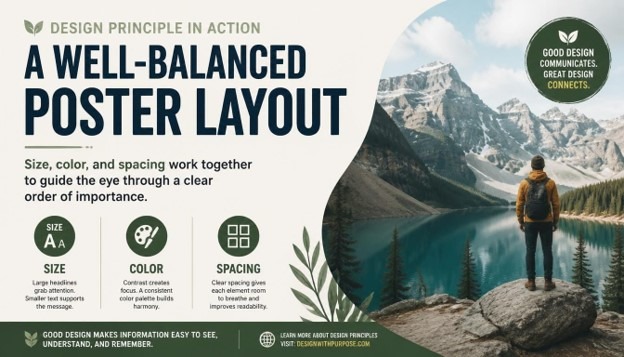
How to Create Strong Visual Hierarchy in Graphic Design
Every great design tells the eye where to look first, where to look next, and where to rest last. This invisible roadmap is called Visual Hierarchy, and it is one of the most important skills any designer can master. Whether you are designing a poster, a website, a mobile app, a brochure, or a full brand identity, understanding how this ordering system works will completely change how your audience experiences your work.
In this guide, we will explore what this concept really means, why it matters so much in every branch of design, and exactly how you can build a strong, intentional structure of importance in your own projects, step by step. By the end, you will have a complete, practical framework you can apply immediately to your next design, no matter what software or medium you work in.
If you have ever looked at a design and felt confused about where to start reading, or noticed yourself skipping over important information without realizing it, you have experienced poor ordering of importance firsthand. On the other hand, when a design feels effortless to scan, understand, and act on, that is the sign of a thoughtful structure at work behind the scenes. This article is written for beginners taking their first steps into design, as well as experienced professionals who want to sharpen their instincts and refine how they organize information visually.
Design is, at its core, a form of communication, and communication only works when the message arrives in the right order. A headline that gets lost among smaller text, a button that blends into the background, or a page so cluttered that nothing stands out are all symptoms of the same underlying problem: a lack of intentional structure. Learning to fix this is one of the highest-leverage skills you can develop as a creative professional.
What Is Visual Hierarchy?

Visual Hierarchy refers to the arrangement or presentation of design elements in a way that clearly implies importance. It is the system designers use to guide a viewer’s eye through a composition in a specific, intentional order, rather than leaving the audience to guess what matters most. A strong version of this system tells people exactly where to look first, second, and third, simply through visual cues like size, color, contrast, spacing, and placement.
Think about a newspaper front page. The biggest headline draws your attention first, followed by a large photo, then a subheading, and finally the smaller body copy underneath. This layered structure is a textbook example of intentional ordering in action. Without it, every element would compete equally for attention, and the reader would have no clear starting point at all.
This ordering system is not just about aesthetics; it is fundamentally about communication. A design can be visually beautiful, but if it lacks a clear sense of priority, it fails at its most basic job, which is helping the viewer understand information quickly and comfortably. This is why the concept is considered one of the foundational principles of graphic design, sitting right alongside balance, contrast, unity, and alignment.
Designers create this sense of order using several visual tools, including:
- Size and scale of elements
- Color and contrast
- Typography and font weight
- Placement and alignment
- Whitespace and spacing
- Repetition and pattern
- Direction and visual flow
Each of these tools plays a distinct role in shaping how the eye moves across a page, screen, or layout. When used together thoughtfully, they combine to create Visual Hierarchy that feels natural, almost invisible, yet remains incredibly effective at directing attention exactly where it needs to go.
Why Visual Hierarchy Matters in Design

Every design has a purpose, whether it is to sell a product, share information, tell a story, or guide someone through an application. A clear structure of importance is what makes that purpose achievable. Without it, even the most creative ideas can fall flat because the audience simply does not know where to focus their attention first.
Here are some of the key reasons this concept matters so much in modern design work.
It improves readability and comprehension. A clear order of importance breaks down complex information into digestible pieces, making it easier for people to read and understand content quickly. This matters enormously in a world where attention spans are short and most people skim rather than read every single word on a page.
It guides user behavior. In web design and app design, Visual Hierarchy is directly tied to conversion rates and engagement metrics. A call-to-action button that stands out because of thoughtful size and color choices is far more likely to get clicked than one that blends quietly into the background of the page.
It creates emotional impact. The order in which someone processes a design affects how they feel about it overall. A strong sense of priority can build anticipation, highlight emotion, or emphasize urgency, all of which shape the viewer’s emotional response to the finished piece.
It builds trust and professionalism. Cluttered, confusing designs with a weak sense of order often feel unprofessional or untrustworthy, even when the underlying content is genuinely solid. A clean, organized structure signals competence and care, which in turn builds credibility with an audience.
It saves the viewer’s time and energy. People do not want to work hard to understand a design. A well-planned Visual Hierarchy does the thinking for them, presenting information in the most logical and efficient order possible so the viewer can absorb it effortlessly.
Because of all these benefits, a strong ordering system is not an optional nice-to-have; it is a core requirement for effective design across every medium, from print advertising to mobile interfaces and everything in between.
Core Principles That Build Visual Hierarchy
To create a strong Visual Hierarchy, you need to understand the individual tools and principles designers use to establish order and importance. Let’s break down each one in detail, with practical guidance you can apply right away.
1. Size and Scale

Size is one of the most powerful and immediate ways to establish order in a composition. Larger elements naturally draw more attention than smaller ones, which is why headlines are bigger than body text, and hero images are bigger than thumbnails. When building this kind of structure through size, think carefully about which element truly deserves to be the largest on the page. It should be the single most important message or focal point in the entire design.
Scale also works in relative terms, not just in absolute numbers. It is not simply about making one thing big; it is about the size relationship between every element on the page. A strong structure uses a clear, consistent scale system, sometimes based on a type scale or an underlying grid, so that size differences feel deliberate rather than random or accidental.
2. Color and Contrast

Color is another major driver of importance in a layout. Bright, saturated, or warm colors tend to attract more attention than muted or cool tones. Contrast, meanwhile, refers to the difference between elements, such as a dark button set against a light background. High contrast naturally draws the eye and reinforces the intended order by making key elements pop against their surroundings.
When designers want to create strong Visual Hierarchy using color, they often reserve their boldest, most saturated color for the single most important action or message on the page, while keeping the rest of the palette more subdued and quiet. This selective, disciplined use of color keeps the composition clean and prevents visual competition between elements that should not be fighting for the same level of attention.
3. Typography and Font Weight

Typography plays an enormous role in establishing a clear order of importance, especially in text-heavy designs like websites, reports, and editorial layouts. Font size, weight, style, and even letter spacing all contribute to how important a piece of text feels to the reader. A bold, large headline signals top-level importance, while lighter, smaller text signals supporting or secondary information further down the ladder.
A well-designed structure typically uses no more than two or three font weights and sizes across headings, subheadings, and body copy. Keeping the typographic system consistent helps reinforce the overall Visual Hierarchy without overwhelming the viewer with too many competing styles fighting for attention at once.
4. Alignment and Placement

Where you place an element on a page has a direct impact on how important it feels. Elements positioned at the top, center, or along natural eye-scanning paths, such as the familiar F-pattern or Z-pattern, tend to be noticed first. Designers use alignment, grids, and strategic placement to control the exact order in which the eye discovers information, reinforcing the intended structure of the piece.
Consistent alignment also creates a sense of order and stability, which subtly strengthens the overall Visual Hierarchy by making the layout feel organized and easy to follow rather than chaotic or accidental.
5. Proximity and Grouping

The principle of proximity states that elements placed close together are perceived as related, while elements spaced further apart are seen as separate or unrelated. This grouping behavior directly supports a clear ordering system because it helps viewers quickly understand which pieces of information belong together, and which stand alone as more important, standalone messages worth noticing on their own.
For example, a price and a product name grouped tightly together read as a single unit, while a call-to-action button placed with generous space around it reads as a separate, more prominent action, strengthening the overall sense of priority across the page.
6. Whitespace and Breathing Room
Whitespace, or negative space, is the empty area around and between elements. Far from being wasted space, whitespace is a critical tool for building strong Visual Hierarchy. Generous whitespace around an element makes it stand out and feel more important, while cramped, tight spacing can bury even the boldest design choices under visual noise.
Minimalist designs often rely heavily on whitespace to create a clean, confident sense of order where every element has room to breathe and be noticed clearly on its own terms, without distraction.
7. Repetition and Consistency
Repetition of certain visual elements, such as consistent button styles, heading treatments, or color coding, helps train the viewer’s eye to recognize patterns over time. This consistency reinforces the structure of importance across multiple pages or screens, so users always know exactly where to look for specific types of information, such as navigation, headings, or calls to action.
8. Direction and Visual Flow
Lines, arrows, the gaze direction of people in photographs, and even the natural reading pattern of a language all influence how the eye moves through a design. Designers can guide attention deliberately by using directional cues that lead the viewer toward the next important element, further reinforcing a strong, deliberate order from start to finish across the entire piece.
How to Create Strong Visual Hierarchy: A Step-by-Step Process
Now that we have covered the core principles, let’s walk through a practical, step-by-step process for building strong Visual Hierarchy into your own design projects, from the very first sketch to the final polished file.
Step 1: Define Your Priority Order
Before opening any design software, list out every element that needs to appear in your design and rank them by importance. What is the single most important message? What comes second? What is merely supporting information that can sit quietly in the background? This priority list becomes the blueprint for your entire structure, and skipping this step is one of the most common reasons designs end up feeling flat, confusing, or directionless.
Step 2: Choose a Focal Point
Every strong composition needs one clear focal point, the element that captures attention first. This could be a headline, a hero image, or a key call-to-action button. Make sure only one element holds this top position; if everything is competing to be the focal point, your overall sense of order will collapse into visual noise that exhausts the viewer.
Step 3: Establish a Size and Type Scale
Create a scale system for your text and design elements, from largest to smallest, that mirrors your priority list from Step 1. This scale becomes the backbone of your Visual Hierarchy, ensuring size differences feel deliberate and proportionate rather than arbitrary or inconsistent across the design.
Step 4: Apply Strategic Color and Contrast
Decide which colors will represent high-priority elements versus supporting elements. Reserve your most vibrant or contrasting color for the top of your structure, and use muted tones for lower-priority content further down the page. This selective approach keeps the composition clear and prevents color from becoming a distracting, confusing element in its own right.
Step 5: Use Grids and Alignment
Set up a grid system to organize your layout from the very beginning. Consistent alignment along this grid reinforces order and structure, which strengthens your design by making the entire composition feel intentional, calm, and easy to scan at a glance.
Step 6: Group Related Elements with Proximity
Review your layout carefully and make sure related items are grouped closely together, while unrelated or more important standalone elements have extra space around them. This spacing strategy is essential for a clean, readable structure that respects the viewer’s time and attention.
Step 7: Add Whitespace Generously
Resist the urge to fill every empty space on the page. Generous whitespace around your most important elements will make your Visual Hierarchy feel more premium, confident, and easy to navigate, rather than cluttered, cramped, and overwhelming to look at.
Step 8: Try the Squint Test
A classic technique used by professional designers to evaluate their layout is the squint test. Squint your eyes while looking at your design; the blurred shapes and contrasts that remain visible should reveal your intended priority order clearly. If the wrong elements stand out during this quick test, your structure needs further adjustment before moving forward.
Step 9: Get Feedback and Iterate
Show your design to someone unfamiliar with the project and simply ask what they notice first, second, and third, without giving them any hints. Their honest answers will tell you whether your Visual Hierarchy is working as intended, or whether certain elements need to be resized, recolored, or repositioned before final delivery.
Step 10: Refine for Different Devices and Contexts
If your design will appear across multiple platforms, such as desktop, mobile, or print, make sure your structure adapts appropriately to each context. What works as a size-based order on a large poster may need to rely more heavily on color and contrast on a small mobile screen where space is limited and every pixel counts.
Visual Hierarchy Across Different Design Disciplines

This ordering principle applies across nearly every design discipline, though the specific tools used may vary slightly depending on the medium and the audience.
In web and UI design, Visual Hierarchy is critical for guiding users toward conversion goals, such as signing up, purchasing a product, or clicking a specific call-to-action. Designers rely heavily on button color, generous whitespace, and typographic scale to build an order that feels intuitive and reduces unnecessary user friction along the way.
In print design, including posters, brochures, and packaging, this same principle often depends more on size, contrast, and composition since there is no scrolling or interactivity for the viewer to rely on. Everything must be communicated within a single static view, making a strong sense of order absolutely essential to the design’s success.
In branding and identity design, Visual Hierarchy helps establish which elements of a logo or brand system should stand out most, whether that is a wordmark, a symbol, or a tagline, ensuring instant brand recognition happens within seconds of first contact.
In editorial and publication design, this structure organizes complex information such as articles, headlines, pull quotes, and captions into a system readers can navigate comfortably, even across dozens or hundreds of pages in a single publication.
In advertising design, a strong sense of order ensures that the core selling message or offer is the very first thing a viewer notices, even in a crowded, distraction-filled environment like a busy social media feed or a cluttered city street.
Common Mistakes That Weaken Visual Hierarchy
Even experienced designers can fall into habits that quietly damage their layout’s sense of order. Here are some of the most common mistakes worth watching for in your own work.
Too many focal points. When everything on the page is bold, colorful, or oversized, nothing truly stands out, and the entire structure breaks down completely under the weight of competing elements.
Inconsistent typography. Using too many font sizes, weights, or styles at once confuses the reader and weakens the intended order the designer was trying to create in the first place.
Ignoring whitespace. Cramming too many elements together without breathing room makes it hard for any single piece to stand out, flattening the entire sense of priority across the page.
Poor color contrast. Low contrast between important and unimportant elements makes it difficult for viewers to distinguish priority at a glance, undermining the whole system of order.
Lack of a clear grid. Random placement without an underlying structure creates visual confusion and prevents a coherent, readable order from ever forming properly.
Designing without a priority list. Jumping straight into visuals without first deciding what matters most is one of the fastest ways to end up with weak, confusing Visual Hierarchy in the final piece.
Tools That Help You Build Visual Hierarchy

Several design tools can help you plan, test, and refine your sense of order throughout a project. Grid and layout tools in software like Adobe InDesign, Illustrator, and Figma allow you to set up consistent alignment systems from the very first draft. Typography scale generators help you establish proportional font sizes for a clean, readable structure. Color contrast checkers ensure your color choices remain accessible and effective at reinforcing importance across different screens and devices. Additionally, simple techniques like grayscale previews and the squint test remain some of the most reliable, tool-free ways to evaluate whether your Visual Hierarchy is genuinely working before you ship the final file.
Real-World Examples of Strong Visual Hierarchy

Think about the homepage of a major technology company. The headline is large and bold, the supporting text is smaller and lighter, and a single, brightly colored button invites you to take action, all classic signs of a deliberate, well-planned structure. Or consider a movie poster, where the title looms large across the top, the lead actor’s face draws the eye toward the center, and the release date sits quietly at the bottom, each element carefully placed to create a clear order that tells a complete story in just a few seconds. These everyday examples show just how universal and essential a strong sense of Visual Hierarchy really is, across every corner of visual communication.
A restaurant menu offers another familiar example. Well-designed menus often highlight a handful of signature dishes with larger text, a small icon, or a boxed border, while the rest of the offerings sit in a quieter, more uniform list below. This selective emphasis is not accidental; it is a deliberate ordering choice designed to nudge diners toward specific, often higher-margin items without them even realizing they are being guided.
Mobile banking apps rely on a similarly disciplined structure. Your account balance usually appears in the largest, boldest text on the screen, since it is the single piece of information most users open the app to check. Secondary actions, such as transferring money or viewing recent transactions, are typically smaller or placed in a row of icons beneath the balance, while settings and less-frequently used features are tucked away in a menu the user has to actively seek out. This layered approach ensures that even a complex financial app feels simple and approachable at a glance.
Visual Hierarchy vs Other Design Principles
It helps to understand how this concept relates to other fundamental design principles like balance, unity, and rhythm. Balance is about distributing visual weight evenly across a composition, while Visual Hierarchy is specifically about establishing an order of importance among elements. A design can be perfectly balanced yet still lack clear priority, leaving the viewer unsure where to look first. Unity, meanwhile, refers to how well all the elements feel like they belong to the same family of design choices, which supports a strong structure but is not the same thing as it.
Rhythm, created through repeated patterns and spacing, can also reinforce a sense of order by establishing predictable visual beats that a viewer’s eye can follow naturally. When all of these principles work together, alongside a deliberate structure of importance, the result is a composition that feels both cohesive and easy to navigate. Understanding these relationships helps designers avoid treating Visual Hierarchy as an isolated technique and instead see it as one thread in a larger, interconnected system of design decisions.
The Business Case for Strong Visual Hierarchy
Beyond aesthetics, there is a genuine business argument for investing time in a strong sense of order within your designs. Companies that prioritize clear structure in their marketing materials, websites, and product interfaces consistently see better engagement, lower bounce rates, and higher conversion numbers. A landing page with confused priorities forces visitors to work harder to find what they need, and many will simply leave rather than search for the answer themselves.
For freelancers and agencies, being able to explain and demonstrate strong Visual Hierarchy to clients is also a valuable communication skill. Clients often cannot articulate why a design feels “off,” but a designer who can point to specific issues, such as competing focal points or inconsistent typography, and offer a clear fix builds trust and credibility much faster. In this sense, mastering this principle is not just a creative exercise; it is a practical business advantage that pays off across client relationships, portfolio quality, and long-term career growth.
A Quick Checklist for Reviewing Your Visual Hierarchy
Before you finalize any design, it helps to run through a short checklist to confirm your structure is working the way you intended. Ask yourself whether there is exactly one clear focal point, whether your size and type scale reflects the true priority of each element, and whether your color choices reinforce or accidentally distract from that priority. Check that related items are grouped closely through proximity, that whitespace is generous around your most important content, and that your grid and alignment feel consistent throughout the entire layout.
It also helps to step back from the screen entirely and view the design at actual size, from a normal viewing distance, rather than zoomed in on your monitor. Many issues with Visual Hierarchy only become obvious once you view a design the way a real audience will encounter it, whether that is a phone held at arm’s length, a poster viewed from across a room, or a webpage seen on a laptop during a quick scroll. Running through this checklist regularly, especially before sending final files to a client or pushing a design live, will help you catch weak spots before they ever reach your audience.
Finally, keep a personal reference library of designs you admire and study why their sense of order works so well. Screenshot landing pages, posters, and app screens that catch your attention effectively, and take a few minutes to break down exactly how size, color, typography, and spacing are being used together. Over time, this habit will sharpen your instincts and make building strong Visual Hierarchy feel far more natural and automatic in your own work.
Conclusion
Mastering Visual Hierarchy is one of the most valuable skills any designer can develop over the course of their career. It transforms a simple collection of shapes, colors, and text into a clear, purposeful story that guides the viewer exactly where they need to go, without confusion or wasted effort. By understanding the core principles, size, color, typography, alignment, proximity, whitespace, repetition, and direction, and by following a structured process to prioritize and test your work at every stage, you can build a genuinely strong sense of order into every design you create from now on. Whether you are designing a website, a poster, a mobile app, or a complete brand identity, a thoughtful, well-executed structure of importance will always make your work more effective, more professional, and far more memorable to the people who see it.
FAQs About Visual Hierarchy
- What is Visual Hierarchy in simple terms? It is the arrangement of design elements in order of importance, using tools like size, color, and spacing to guide the viewer’s eye through a composition in a specific sequence.
- Why is Visual Hierarchy important in graphic design? This structure helps viewers quickly understand what matters most in a design, improving readability, guiding user behavior, and making the overall composition feel professional and easy to navigate.
- What are the main elements used to create Visual Hierarchy? The main elements include size and scale, color and contrast, typography, alignment, proximity, whitespace, repetition, and directional flow across the page.
- How does color affect this kind of ordering? Bright, saturated, or high-contrast colors draw more attention, so designers use color strategically to highlight the most important elements and support a clear overall structure.
- Can this principle be applied to web design and apps? Yes, Visual Hierarchy is essential in web and app design, where it guides users toward key actions like clicking a button, signing up, or completing a purchase.
- What is the squint test used for? The squint test involves blurring your vision while looking at a design to see which shapes and contrasts remain visible, helping you evaluate whether your Visual Hierarchy is working as intended.
- What are common mistakes that ruin this kind of structure? Common mistakes include having too many competing focal points, inconsistent typography, poor use of whitespace, low color contrast, and designing without a clear priority order from the start.
- How many levels should a strong structure have? While there is no fixed rule, most effective designs use around three to five levels of importance, such as primary, secondary, and tertiary elements, to avoid overwhelming the viewer.
- Does this matter in print design as much as digital design? Yes, Visual Hierarchy is just as important in print design, where designers rely more heavily on size, contrast, and layout since there is no scrolling or interactivity to guide the viewer along.
- How can beginners practice building better structure into their work? Beginners can practice by listing design priorities before starting a project, studying real-world examples closely, and using the squint test to check whether their Visual Hierarchy successfully highlights the most important elements first.
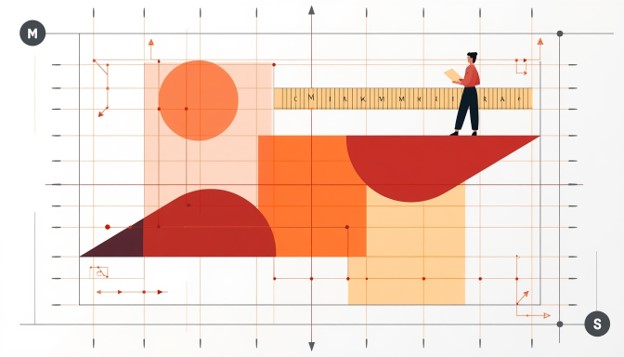
Design Composition Explained: A Complete Beginner’s Guide (2026)
Every image, poster, app screen, and room you have ever found visually pleasing owes its success to one thing: strong Design Composition. Whether you are a graphic designer, a UI/UX beginner, a photographer, or someone who simply wants to understand why some designs “feel right” while others feel messy, understanding Design is the single most important skill you can learn in 2026. This guide breaks down everything you need to know about Design Composition in plain, beginner-friendly language, with examples, visuals, and actionable steps you can start using today.
In this complete guide, we will explore what Design actually means, why Design matters so much in every creative field, the core elements and principles that make up great Design Composition, how Design Composition is applied differently across graphic design, UI/UX, photography, and interior design, and finally a step-by-step process to help you master Design even if you have zero prior experience. By the end of this article, you will not only understand Design conceptually but also know exactly how to apply it to your own projects.
What Is Design Composition?
Design refers to the way individual visual elements — such as lines, shapes, colors, textures, and space — are arranged together to create a unified, purposeful, and visually appealing whole. Think of Design Composition as the architecture behind any visual work. A painting, a website homepage, a magazine cover, a mobile app screen, or even a living room layout all rely on Design Composition to guide the viewer’s eye, communicate a message, and create emotional impact.
At its core, Composition is about arrangement and relationships. It is not just about making something “look nice” — it is about making deliberate decisions on where every element sits in relation to every other element. Good Composition answers questions like: What should the viewer notice first? Where should their eyes travel next? What feels balanced, and what feels chaotic? Every professional designer, illustrator, photographer, and architect uses the principles of Design every single day, whether they realize it consciously or not.

Beginners often assume Design is only relevant to graphic design software like Photoshop or Illustrator, but that is a misconception. Design Composition is a universal visual language. It applies to logo design, website layouts, social media graphics, packaging design, film cinematography, photography, painting, and even furniture arrangement in interior design. Anywhere visual elements are placed together intentionally,Composition is at work.
Why Design Composition Matters So Much
Understanding Design is not optional if you want to create work that communicates clearly and looks professional. Poor Design Composition results in cluttered, confusing, or unbalanced designs that fail to hold attention or convey a message effectively. On the other hand, strong Design immediately signals professionalism, clarity, and intentionality — even before a viewer reads a single word of text.
From a business perspective, Design Composition directly impacts user engagement, conversion rates, and brand perception. A website with poor Design will confuse visitors and increase bounce rates, while a website built on solid Design principles guides visitors naturally toward calls to action. In marketing materials, good Design determines whether a potential customer’s eye lands on your brand message or gets lost in visual noise. In photography and film, Composition is what separates an amateur snapshot from a striking, gallery-worthy image.
Learning Design also improves your ability to critique your own work. Once you understand the underlying rules of Design Composition, you stop guessing whether something “looks off” and instead can pinpoint exactly why — whether it’s a lack of contrast, poor alignment, or an imbalance of visual weight. This diagnostic ability is what separates beginners from professionals, and it all starts with a solid grounding in Design Composition.
A Brief History of Design Composition
The principles behind Design are not new inventions of the digital age — they date back centuries. Renaissance painters used geometric structures like the golden ratio to arrange their subjects, laying early groundwork for what we now call Design. Classical architecture relied heavily on symmetry and proportion, concepts that remain central to modern Design Composition theory. In the 20th century, the Bauhaus movement formalized many of the grid-based and functional approaches to Design that graphic designers still use today.
As design moved into digital spaces, Design Composition evolved to include new considerations like scrolling behavior, responsive layouts, and interactive hierarchies. However, the fundamental goals of Design — clarity, balance, and intentional visual flow — have remained unchanged. Understanding this history helps beginners appreciate that Design Composition is a time-tested discipline, not just a trendy design buzzword.
The Core Elements Used in Design Composition
Before diving into the principles of Design Composition, it’s important to understand the raw building blocks designers use. Every strong Design is built from a combination of the following elements:
Line – Lines guide the eye and create structure within a Design Composition. They can be straight, curved, thick, thin, implied, or explicit, and they often define boundaries or pathways for the viewer’s gaze.
Shape – Shapes form the basic containers of visual information in any Design Composition. Geometric shapes feel structured and modern, while organic shapes feel natural and soft.
Color – Color is one of the most emotionally powerful tools in Design Composition. It creates mood, establishes hierarchy, and draws attention to focal points.
Texture – Texture adds depth and tactile interest to a Design Composition, whether it’s a literal texture in a photograph or a simulated texture in a digital design.
Space (Negative Space) – Space, particularly negative space, is often the most overlooked element of Design Composition. It gives elements room to breathe and prevents visual clutter.
Form – In three-dimensional contexts like product design or interior design, form refers to the physical volume and structure that contributes to overall Design Composition.

Mastering how these elements interact is the first practical step toward understanding Design at a professional level. Every principle discussed in the next section is essentially a rule for how to combine these elements effectively within any Design Composition.
The Core Principles of Design Composition
Now that we understand the building blocks, let’s explore the actual principles that govern great Design Composition. These principles apply universally, regardless of whether you’re designing a poster, a mobile app, or a photograph.
- Balance
Balance is one of the most fundamental principles of Graphic Design. It refers to the distribution of visual weight across a layout. There are two primary types of balance used in Design: symmetrical balance, where elements mirror each other around a central axis, and asymmetrical balance, where different elements of varying size and visual weight are arranged to feel equally distributed without being identical. Symmetrical Design feels formal, stable, and calm, while asymmetrical Design Composition feels dynamic and modern. Understanding when to use each type of balance is a core skill for anyone learning Design Composition.
- Contrast
Contrast in Design Composition refers to the difference between elements — in size, color, shape, or texture — used to create emphasis and visual interest. Without contrast, a Design feels flat and monotonous. Designers use contrast strategically to highlight the most important element in a layout, such as a call-to-action button on a website or the subject of a photograph. Strong contrast is often what makes a Design feel bold and confident rather than timid and forgettable.
- Alignment
Alignment is the invisible thread that holds a Design together. When elements are aligned along shared edges or axes, the entire Design feels organized and intentional, even if the viewer doesn’t consciously notice the alignment itself. Poor alignment is one of the most common reasons a Design Composition feels amateurish, so mastering grids and alignment tools is essential for beginners.
- Proximity
Proximity in Design refers to grouping related elements close together so viewers instinctively understand they belong to the same category or idea. Effective use of proximity reduces cognitive load and helps a Design Composition communicate information more efficiently, especially in interfaces with lots of text or data.
- Repetition
Repetition reinforces consistency throughout a Design Composition. Repeating colors, fonts, shapes, or spacing patterns creates rhythm and helps unify a Design into a cohesive whole, especially across multi-page documents, websites, or branding systems.
- Visual Hierarchy
Visual hierarchy determines the order in which a viewer’s eyes move through a Design Composition. By manipulating size, color, contrast, and placement, designers control what gets noticed first, second, and last. Strong visual hierarchy is arguably the most important outcome of good Design Composition, especially in UI/UX design, where hierarchy directly impacts usability.

- White Space (Negative Space)
White space, sometimes called negative space, is the empty area surrounding elements in a Design Composition. Beginners often mistakenly try to fill every inch of a canvas, but skilled designers understand that white space is an active ingredient in Design, not an absence of design. Generous white space makes a Design feel premium, readable, and calm.
- Movement
Movement refers to the path the eye takes through a Design Composition, often guided by lines, diagonal elements, or a sequence of shapes that lead the viewer’s gaze from one focal point to another. Strong movement keeps a Design Composition feeling dynamic rather than static.
- Scale and Proportion
Scale and proportion govern the relative size of elements within a Design Composition. Playing with scale — making one element dramatically larger than others — is a powerful way to establish hierarchy and drama within a Design Composition.
- Unity and Harmony
Unity is the ultimate goal of any Design Composition: the sense that all elements belong together as a single, cohesive piece, rather than a random collection of parts. Achieving unity requires balancing all the other principles of Design Composition discussed above.
The Role of Color Theory in Design Composition
Color is one of the most emotionally charged tools available to anyone working on a layout, and it plays an outsized role in shaping how a composition is perceived. When color choices are aligned with the goals of the overall arrangement, the result feels intentional and polished; when they clash, even a technically well-structured layout can feel amateurish. A warm palette tends to draw the eye forward and create energy, while cooler tones recede and create calm, both of which are useful strategies depending on what the arrangement is trying to achieve. Complementary colors — those sitting opposite each other on the color wheel — create vibrant contrast that naturally guides attention toward a chosen focal point, while analogous colors sitting near each other create a softer, more harmonious feel. Beginners often overlook how much color temperature and saturation affect the perceived weight of an element; a small but highly saturated shape can visually outweigh a much larger, muted one. Learning to control this relationship is a critical extension of everything discussed so far, since color decisions ultimately reinforce or undermine the hierarchy and balance already built into a layout. Before finalizing any project, it helps to convert it to grayscale temporarily; if the hierarchy and balance still read clearly without color, the underlying structure is strong, and the color palette is simply adding polish rather than doing all the heavy lifting.
The Role of Typography in Design Composition
Typography deserves its own dedicated discussion because text is present in the overwhelming majority of real-world layouts, from posters to app interfaces to packaging. The way headlines, subheadings, and body copy are sized, spaced, and positioned relative to one another directly reflects the same hierarchy and alignment principles covered earlier. A common beginner mistake is choosing too many typefaces within a single project, which fractures the sense of unity that a cohesive arrangement depends on. A safer approach is to limit a project to two typefaces — one for headlines and one for body text — and rely on weight, size, and spacing variations within those two families to create contrast and hierarchy. Line length, line height, and letter spacing all influence readability and, by extension, the perceived quality of the overall structure. Large, bold headlines paired with generous surrounding space immediately signal confidence and clarity, while cramped, inconsistently sized text creates the same cluttered feeling that comes from overcrowding visual elements. Treating typography as a structural element, rather than an afterthought added at the end, is one of the fastest ways for a beginner to level up their results.
Real-World Case Studies of Strong and Weak Composition
Looking at real examples makes abstract principles far easier to internalize. Consider two versions of the same event flyer: in the weak version, the date, location, headline, and decorative graphics are all roughly the same size and scattered without a clear grid, forcing the viewer to hunt for information. In the strong version, the event name is dramatically larger than everything else, the date and location are grouped tightly together in a secondary tier, and generous margins frame the entire piece — the same information, but now instantly scannable because of deliberate hierarchy and spacing decisions. A similar contrast appears in mobile app onboarding screens: a weak screen crams an illustration, three paragraphs of text, and two buttons into a single crowded view, while a strong screen isolates one clear message per screen, uses a single dominant illustration, and places a single obvious call-to-action button with room to breathe around it. In photography, comparing a snapshot where the subject is dead-center and cluttered by background distractions against a reframed shot using the rule of thirds and a simplified background shows exactly how repositioning elements within the same frame can transform a forgettable photo into a striking one. These examples all reinforce the same lesson: the raw content rarely changes between a weak and a strong version — what changes is the arrangement, spacing, and hierarchy applied to that content.
Design Composition Trends to Watch in 2026
Visual trends shift over time, and staying aware of current directions helps beginners create work that feels current rather than dated. In 2026, asymmetrical and broken-grid layouts continue to gain popularity across websites and social graphics, replacing the rigid, centered layouts that dominated earlier design eras, while still relying on the same underlying balance principles to avoid feeling chaotic. Bold, oversized typography paired with minimal supporting imagery is increasingly common in digital marketing, reflecting a broader shift toward clarity and fast scannability on small mobile screens. Muted, earthy color palettes combined with occasional high-saturation accent colors are trending across branding projects, replacing the flat, overly bright palettes popular a few years earlier. In UI/UX work specifically, generous white space and simplified single-focus screens continue to dominate, driven by accessibility standards and the reality that most users interact with interfaces on small mobile devices. Regardless of which surface-level trend is currently popular, the underlying fundamentals of balance, contrast, hierarchy, and unity remain the constant foundation that every trend is built on top of — which is exactly why learning these fundamentals first will keep your skills relevant no matter how visual styles evolve.
Design Composition and Accessibility
An often-overlooked dimension of building strong layouts is accessibility — ensuring that the arrangement of elements works for people with visual impairments, color blindness, or cognitive differences. Sufficient color contrast between text and background is not just an aesthetic choice but a functional requirement that affects whether a large portion of your audience can actually read your content. Clear hierarchy and logical reading order become even more important for users relying on screen readers, since a jumbled or purely decorative arrangement can make navigation genuinely difficult rather than just visually unappealing. Generous spacing between interactive elements, such as buttons and links, prevents accidental taps and improves usability for people with motor impairments. Treating accessibility as a core requirement, rather than an afterthought, ultimately produces stronger, clearer work for every single viewer, not just those with specific needs — reinforcing once again that clarity and intentional structure benefit everyone.
A Quick Checklist Before Finalizing Any Layout
Before calling a project finished, it helps to run through a short checklist to catch common issues. Ask whether there is one unmistakable focal point that draws the eye first. Check whether elements share consistent alignment along visible or invisible grid lines. Confirm that related items are grouped closely together while unrelated items have clear separation between them. Verify that color and size contrast are being used purposefully to reinforce hierarchy rather than randomly scattered across the piece. Make sure there is enough breathing room around key elements so nothing feels cramped or overwhelming. Finally, step back and view the piece from a distance, or shrink it down on screen, to confirm that the overall shape still feels balanced and unified even without focusing on individual details. Running through this checklist consistently, project after project, is how the underlying instincts eventually become automatic.
Design Composition Across Different Creative Fields
One of the most powerful things about learning Design Composition is that the skill transfers across multiple creative disciplines. Let’s look at how Design Composition is applied differently depending on the medium.
Design Composition in Graphic Design
In graphic design, Design Composition governs how logos, posters, brochures, and branding materials are laid out. Graphic designers rely heavily on grids, typography hierarchy, and color theory to achieve strong Design Composition across static visual materials.

Design Composition in UI/UX Design
In UI/UX design, Design Composition takes on added complexity because it must account for user interaction, responsiveness across devices, and accessibility. A well-structured Design Composition in an app or website reduces friction, improves usability, and increases conversions. UI/UX designers use Design Composition principles like hierarchy and proximity to guide users naturally through onboarding flows, forms, and checkout processes.
Design Composition in Photography
In photography, Design Composition is expressed through techniques like the rule of thirds, leading lines, framing, and symmetry. Photographers physically move themselves or their subjects to achieve strong Design Composition within the camera’s frame, rather than adjusting elements after the fact in software.

Design Composition in Interior Design
In interior design, Design Composition extends into three-dimensional space. Furniture placement, lighting, color palettes, and negative space within a room all reflect the same underlying principles of Design Composition used in two-dimensional graphic work.

Design Composition in Architecture
Architects apply Design Composition at massive scale, balancing structural elements, facades, and spatial flow to create buildings that feel both functional and visually striking. The same rules of balance, proportion, and rhythm found in smaller-scale Design Composition work apply directly to architectural planning.
Step-by-Step Guide to Creating a Strong Design Composition
If you are a beginner looking to practically apply everything discussed above, here is a step-by-step process for building your own effective Design Composition, whether you’re working in Photoshop, Figma, Canva, or even with a pencil and paper.
Step 1: Define Your Focal Point Before touching any tool, decide what the single most important element of your Design Composition will be. Every strong Design Composition has one clear focal point that anchors the entire layout.
Step 2: Choose a Grid or Structure Set up a grid system to guide alignment throughout your Design Composition. Even loose, asymmetrical layouts benefit from an underlying invisible grid.
Step 3: Establish Hierarchy Decide the order in which you want viewers to notice elements, and use size, color, and placement to reinforce that hierarchy throughout your Design Composition.
Step 4: Balance Your Elements Step back and evaluate whether your Design Composition feels visually balanced. Ask yourself if one side feels heavier than the other, and adjust size or spacing accordingly.
Step 5: Add Contrast Strategically Use contrast in color or size sparingly to draw attention to your focal point without overwhelming the rest of the Design Composition.
Step 6: Leave Room to Breathe Resist the urge to fill every space. Generous white space is often what separates a beginner’s cluttered attempt from a polished, professional Design Composition.
Step 7: Review for Unity Finally, zoom out and check whether your Design Composition feels like one cohesive piece. If any element feels out of place, revisit the principles above until the entire Design Composition feels unified.
Common Mistakes Beginners Make in Design Composition
Even with a solid understanding of theory, beginners frequently make certain mistakes when applying Design Composition in real projects. Recognizing these mistakes early can save you countless hours of frustration.
One of the most common mistakes is overcrowding a Design Composition with too many competing elements, leaving no clear focal point. Another frequent issue is ignoring alignment, which makes a Design Composition feel sloppy even if individual elements are well-designed. Beginners also often misuse color contrast, either making everything the same intensity (resulting in a flat Design Composition) or using too many competing bright colors (resulting in visual chaos). Finally, many beginners neglect white space entirely, mistakenly believing that a busier Design Composition looks more impressive, when the opposite is usually true.
Tools That Help You Practice Design Composition
Fortunately, you don’t need expensive software to start practicing Design Composition in 2026. Free tools like Canva and Figma offer built-in grid systems and alignment guides that make experimenting with Design Composition accessible to complete beginners. Adobe Photoshop and Illustrator remain industry standards for more advanced Design Composition work, particularly in professional graphic design and branding. Photographers can practice real-world Design Composition using nothing more than a smartphone camera with a grid overlay enabled to apply the rule of thirds. For interior design, free room-planning apps allow you to experiment with spatial Design Composition before committing to physical furniture placement.
Tips to Improve Your Design Composition Skills Over Time
Improving your eye for Design takes consistent, deliberate practice rather than passive study. Start by analyzing designs you admire and try to identify exactly which principles of Design Composition are at play — is it strong contrast, clever use of negative space, or a clear hierarchy? Recreate simple layouts from memory to train your instincts around Design without relying on a reference image. Study the work of established designers, photographers, and architects, since exposure to high-quality Design examples trains your visual instincts faster than theory alone. Finally, seek feedback on your own Design attempts from more experienced designers, since an outside perspective often catches balance or hierarchy issues you may not notice yourself.
Practice Exercises to Build Your Eye for Design Composition
Theory only goes so far without deliberate practice, so here are a few simple exercises anyone can start today, regardless of skill level. First, try the “one-hour recreation” exercise: pick a poster, website homepage, or photograph you admire, and attempt to recreate its layout structure using only basic shapes and placeholder text, focusing purely on matching the proportions, spacing, and hierarchy rather than the exact content. This trains your eye to see structure independently of subject matter. Second, try the “subtraction exercise”: take one of your own recent layouts and remove one element at a time, asking after each removal whether the piece feels stronger or weaker — this quickly reveals which elements are essential and which were simply adding clutter. Third, practice the “five-second test”: show a layout to a friend for exactly five seconds, then ask what they remember; if they can’t identify the main focal point or message, the hierarchy needs work. Fourth, try constraint-based practice by limiting yourself to only two colors and one typeface for an entire project, which forces you to rely on spacing, contrast, and scale rather than decoration to create visual interest. Finally, keep a running folder of layouts, photographs, and interfaces you personally find effective, and periodically revisit it to identify recurring patterns — over time, you’ll notice the same handful of structural decisions appearing again and again across otherwise very different pieces, which is exactly the kind of pattern recognition that separates confident, intuitive work from guesswork.
Repeating these exercises regularly, even for just twenty or thirty minutes a week, compounds quickly. Most beginners are surprised at how fast their instincts sharpen once they start actively analyzing structure instead of passively consuming finished work. The goal is not to memorize rigid rules but to internalize a flexible sense of what makes an arrangement feel balanced, clear, and intentional — a sense that, once developed, applies automatically to any new project you take on, whether it’s a client brief, a personal photography series, or redesigning your own living room.
Conclusion
Design Composition is the invisible framework behind every successful visual creation, from a simple social media graphic to a full architectural masterpiece. By understanding the core elements — line, shape, color, texture, and space — along with the guiding principles of balance, contrast, alignment, hierarchy, and unity, you now have the foundational knowledge needed to evaluate and create strong Design in any medium. Remember that mastering Design is a gradual process built through consistent practice, critical observation, and a willingness to revise your work until it feels truly unified. Whether you’re designing your first logo, laying out a website, framing a photograph, or arranging a living room, the principles of Design Composition covered in this guide will serve as your foundation for years to come.
Frequently Asked Questions (FAQs)
Q1: What is Design Composition in simple terms? Design Composition is the arrangement of visual elements — such as lines, shapes, colors, and space — into a balanced, purposeful, and visually appealing layout.
Q2: Why is Design Composition important for beginners to learn? Learning Design Composition helps beginners understand why certain designs look professional and others look cluttered, giving them the tools to diagnose and fix issues in their own work.
Q3: What are the main principles of Design Composition? The main principles include balance, contrast, alignment, proximity, repetition, visual hierarchy, white space, movement, scale, and unity.
Q4: Does Design Composition apply to photography as well as graphic design? Yes. Design Composition applies universally, and photographers use specific techniques like the rule of thirds and leading lines to achieve strong composition within the camera frame.
Q5: What tools can I use to practice Design Composition as a beginner? Free tools like Canva and Figma, along with smartphone camera grid overlays, are excellent starting points for practicing Design Composition without any prior experience.
Q6: How long does it take to get good at Design Composition? There is no fixed timeline, but consistent practice — analyzing existing designs and recreating simple layouts — can noticeably improve your Design Composition skills within a few months.
Q7: Is Design Composition the same as graphic design? No. Design Composition is one core component within graphic design, but it also applies to photography, UI/UX design, interior design, and architecture.
Q8: What’s the difference between balance and symmetry in Design Composition? Symmetry is one specific type of balance where elements mirror each other exactly, while balance more broadly includes asymmetrical arrangements where different-sized elements still feel evenly distributed in visual weight.
Q9: Can good Design Composition fix weak content or a weak photo subject? Strong Design Composition can significantly improve how content is perceived and often rescues an otherwise average subject, but it cannot fully replace the need for a genuinely interesting subject or message.
Q10: Should beginners follow Design Composition rules strictly, or is it okay to break them? Beginners benefit from learning the standard rules first, since understanding why a rule works makes it far easier to break intentionally later for creative effect, rather than breaking it out of confusion.
-

 Graphics Design2 years ago
7.Exploring the Importance of Color Theory Charts
-

 Graphics Design1 year ago
Top 10 Best Graphic Design Tools for Beginners in 2025 (Free & Paid)
-

 Graphics Design2 years ago
10 Stunning Gradient Design Trends You Need to Know in 2024
-

 Graphics Design12 months ago
15 Freelance Graphic Design Tips to Boost Your Career in 2025
-

 Graphics Design2 years ago
29.Retro Design Is Making a Comeback in Modern Spaces
-

 Graphics Design1 year ago
Best Laptops for Graphic Designers – 2025 Buying Guide
-

 Graphics Design1 year ago
2025 Logo Design Trends: What’s In, What’s Out?
-

 Graphics Design2 years ago
15.The Importance of Effective Flyer Design in Marketing
disposable Temporary Email
September 28, 2024 at 2:13 pm
I’m often to blogging and i really appreciate your content. The article has actually peaks my interest. I’m going to bookmark your web site and maintain checking for brand spanking new information.
Muhammad Ubaid
September 28, 2024 at 2:32 pm
Thank you so much
Can I create a backlink to my website on your website?
disposable Temporary Email
September 28, 2024 at 2:36 pm
Pretty! This has been a really wonderful post. Many thanks for providing these details.
Muhammad Ubaid
September 28, 2024 at 2:37 pm
Thank you
free temp mail
October 3, 2024 at 12:11 pm
Pretty! This has been a really wonderful post. Many thanks for providing these details.
Winfred Zaruba
October 26, 2024 at 8:18 am
I am often to running a blog and i actually respect your content. The article has actually peaks my interest. I’m going to bookmark your site and preserve checking for brand spanking new information.
Mountsinai
November 7, 2024 at 6:01 am
Mountsinai For the reason that the admin of this site is working, no uncertainty very quickly it will be renowned, due to its quality contents.